Real estate module

Real estate software connected to your agency website

Publish your properties and turn every visit into a contact

Enter your properties once and publish them on your website, with search, a map and energy ratings. Every viewing request reaches your CRM, linked to the property, and your buyers book their viewing online.

Google 5.0/5

Display your full portfolio, let visitors filter and compare, and find every enquiry in your software.

Ideal for agencies

Your website works through the night

Your properties appear with search, filters, map and detailed listings, styled to match your brand. You enter them once in Eazyclick, and every interested visitor becomes a qualified contact.

  • Grid, filters and map styled for your agency

  • A sold property leaves search results automatically

  • Pre-filled form on every property listing

12 min

average time to go live

0

duplicate entry

A website that turns every visit into a qualified contact

With a separate website, every property needs entering twice, sold properties linger online and viewing requests get lost in an inbox. With the Real estate module, you enter the property once and publish it on your website.

The module turns your website into a connected showcase: search, filters, map and detailed listings styled to match your brand, fed by your properties in Eazyclick. No WordPress plugin to update or bridge to monitor: the connection is part of the website.

A published property appears on your website, a sold one leaves the search, and every enquiry reaches your CRM as a contact linked to the property.

Who is Real estate for?

  • Estate agencies
  • Independent agents
  • Agencies switching software
  • Static showcase websites needing a connection
  • Rental property managers
Book a free call

New in the console

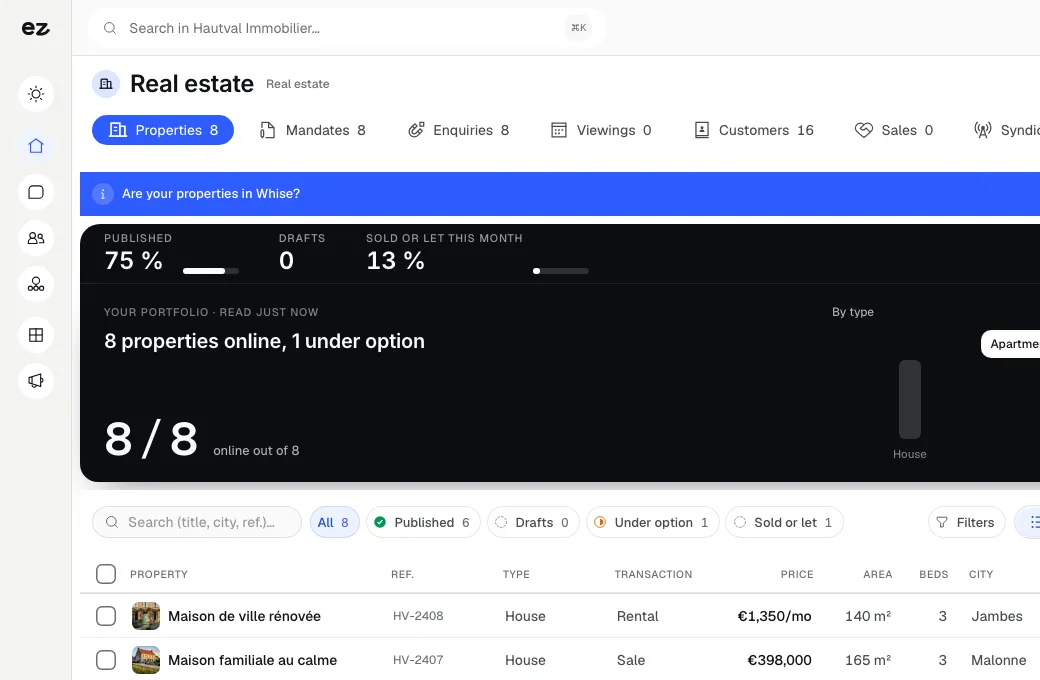
Your properties on the map, your viewings in order

The latest console screens, as they are, at Hautval Immobilier, a demo agency.

  1. New

    Your properties on the map, prices in view

    Every live listing becomes a pin with its price or rent: with a buyer on the phone, you see at a glance what is available in their area.

  2. New

    Your viewing round, in the right order

    The day's viewings line up on the map and reorder with a drag. Ziggy suggests the shortest order and tells you how many kilometres your own order adds.

  3. New

    The right buyers for every property

    Every saved search is matched against the property: a ring shows the match score, and you offer the property to the closest buyers in one click.

  4. New

    Interest in a property, in three numbers

    At the top of the property record: interested buyers, viewings and live offers, updated with every enquiry and every viewing.

What the module does for your estate agency website

A property showcase that invites exploration

Your properties appear in a grid with photo, price, town, bedrooms, floor area and energy rating. Visitors filter, compare and locate each property on a map that matches your website's design. A smooth search experience that keeps visitors engaged.

  • Complete grid
    Photo, price, town, bedrooms, floor area and energy rating for each property
  • Useful filters
    Budget, floor area, bedrooms, type and status, for sale and rental properties
  • Map view
    Visitors locate each property on a map before choosing
  • Detailed listings
    Gallery, features, description and neighbourhood, matching your website's design exactly

Your properties managed in Eazyclick, with no WordPress plugin

You enter each property once in Eazyclick: photos, price, status, energy rating and description. Then you publish it on your website, with no extension to install or update.

  • Entered once
    The property you enter in Eazyclick appears on your website, with no rekeying.
  • No plugin to maintain
    No WordPress extension to update: the property showcase is part of your website.
  • One listing to maintain
    Change the price, status or photos in Eazyclick, and the live listing follows.
  • Switching software too
    Your existing properties and contacts are carried over at the start.

Enquiries land in your CRM

On every property listing, a pre-filled form lets visitors request a viewing or information. The enquiry reaches your Eazyclick CRM as a contact linked to the property, ready for your call back.

  • Pre-filled form
    Visitors request a viewing or information from the listing.
  • Linked to the property
    The contact, their message and the property requested, on one record.
  • Followed step by step
    Stage, next action and history of the enquiry, in your CRM.
  • Nothing gets lost
    Website enquiries no longer sit in an inbox.

Valuations, alerts and sold properties

The module goes beyond a showcase: it helps win instructions and stay in touch with buyers. For the valuation page, see our online valuation guide.

  • Online valuation requests
    The owner describes their property and requests an appointment: a seller lead reaches your CRM.
  • Buyer alerts
    Visitors save their search and receive new properties that match.
  • “Sold” listings and similar properties
    A sold property can stay visible, with comparable properties for buyers who arrived too late.
  • A review after the sale
    A Google review request goes out after a sale or viewing, and your reviews appear on your listings.

A big thank you to Antoine and the whole Eazy Click team for their excellent work and ongoing support for our finest showcase: the CLC Immo website.
Creative, effective and always ready to tackle technical challenges, they have met our expectations while remaining competitively priced.
After more than 10 years of working together, I highly recommend their services. (translated from French)

Tanguy – Director, Estate Agency

Tanguy Langenaeken Director, CLC Immo
Read their story →

We revised our website with the Eazyclick team to update it following changes to the data transfer connection, and took the opportunity to refresh the design. The result met our expectations, and communication with the Eazyclick team was good. I recommend them.

IMMO REFERENCES

Very happy with my experience with Eazyclick. My new website is ready to use, everything works perfectly, no complaints. I had support at every stage. An efficient, friendly team, highly recommended! (translated from French)

Thomas Prudhomme Co-founder, Soko Rooftop
Read their story →
0:00 / 0:00
0:00 / 0:00

Your properties on your website in 3 steps

Three steps. No mental load. A module that works for you, not the other way round.

View all modules
Step 01

We set up the module and carry over your properties

Your project manager sets up your property management in Eazyclick and carries over the properties from your current software if you have one. They configure your filters, map and listings to match your agency's design.

Step 02

Your properties appear and update automatically

Your properties appear on your website with search, filters and map. Synchronisation runs automatically: additions, changes and removals follow your software. No more rekeying, and your showcase stays up to date.

Step 03

Contacts land in your software

Every visitor who requests a viewing becomes a qualified contact, in your inbox and your business software, linked to the relevant property. Track your leads from one dashboard and call back at the right time.

Modules to complement your property website

Every activated module strengthens the others

CRM Pro

Customer relationships

Your leads organised, tracked and followed up.

Every form, appointment and order lands in your pipeline. Drag deals from one stage to the next and know who to follow up every morning.

Discover

WhatsApp messaging

Customer relationships

WhatsApp, shared by your team, linked to customer records.

Customer messages arrive in a shared inbox on your dashboard. The whole team can reply, everyone sees who is handling what, and every exchange joins the customer record.

Discover

Bookings & appointments

Commerce & payments

Customers book while you work.

Customers see your actual availability and book 24 hours a day. The slot is blocked, the confirmation and day-before reminder send automatically, and the appointment joins the customer record.

Discover

Reviews & testimonials

Visibility & acquisition

Your best reviews, showcased on your website.

Your Google reviews sync automatically and appear on your pages in your design. Visitors see what your customers think of you right when they are hesitating.

Discover

Real estate: connected to your tools

  • Migration from your software

    Already using Whise, Omnicasa or other software? We adapt. From Whise, the migration imports your properties (even beyond 2,000), your contacts and their history, with the supported photos and documents; a report flags what is left to check. The Omnicasa connection is coming soon.

  • Synced until you switch

    During the transition, you can switch on a nightly import of the changes made in Whise: you re-enter nothing, and you switch when you are ready.

  • Other software, or none

    Your project manager carries over your properties with you, and your contacts import into the CRM from a CSV file. Without software, you manage everything in Eazyclick from day one.

What the Real estate module includes

Included in Spark (1 of the 2 modules of your choice) and in Boost

In a trade pack: one fixed price for all the pack's modules.

What's included

  • Sync with your property software, with unlimited properties
  • Search, filters, map and property listings with PEB energy ratings
  • Viewing and valuation requests in your software and CRM
  • Setup by your project manager

Your property software licence and portal subscriptions (Immoweb, Zimmo, Immovlan) remain separate: the module does not replace them.

Which trades is the Real estate module built for?

The Real estate module is not limited to one trade. Each page below presents a business that puts it forward: what its website does, the other useful modules and our pricing. Open the one that matches yours to see the module in context.

Three plans. One tool.

Run your business and make it visible: pick the plan that fits your activity, not an imaginary budget.

excl. VAT

Free

Try Spark for free

Start for free

€ 0 for 14 days

Your trade’s pack on trial, no card needed

After 14 days: read-only account, website still online

Ziggy and help centre

Users
3 during the trial
Standard modules
Your trade’s pack
Premium modules
To discover during the trial
Website
Template website to customise, live on an Eazyclick address

Spark

Run it and be seen

Most recommended

From

€ 71/month instead of € 99

€ 672 less over 24 months than with no commitment

1 h with your project manager every month

Users
3 included, then €11 per user, decreasing
Standard modules
2 included, then decreasing
Premium modules
Optional
Website
4-page website included; 6 pages or more from €19/month, Custom or High-end

Boost

Tailor-made and multi-site

From

€ 620/month instead of € 865

€ 5,880 less over 24 months than with no commitment

2 h with your project manager every month

Users
10 included
Standard modules
Unlimited
Premium modules
Optional, SEO Boost included
Website
High-end, developed to measure

The Real estate module, from listing to deed

Your whole agency in one piece of software

List, value, show, sell and let: every step of your work has its screen, with Ziggy, Eazyclick's AI assistant, preparing your replies.

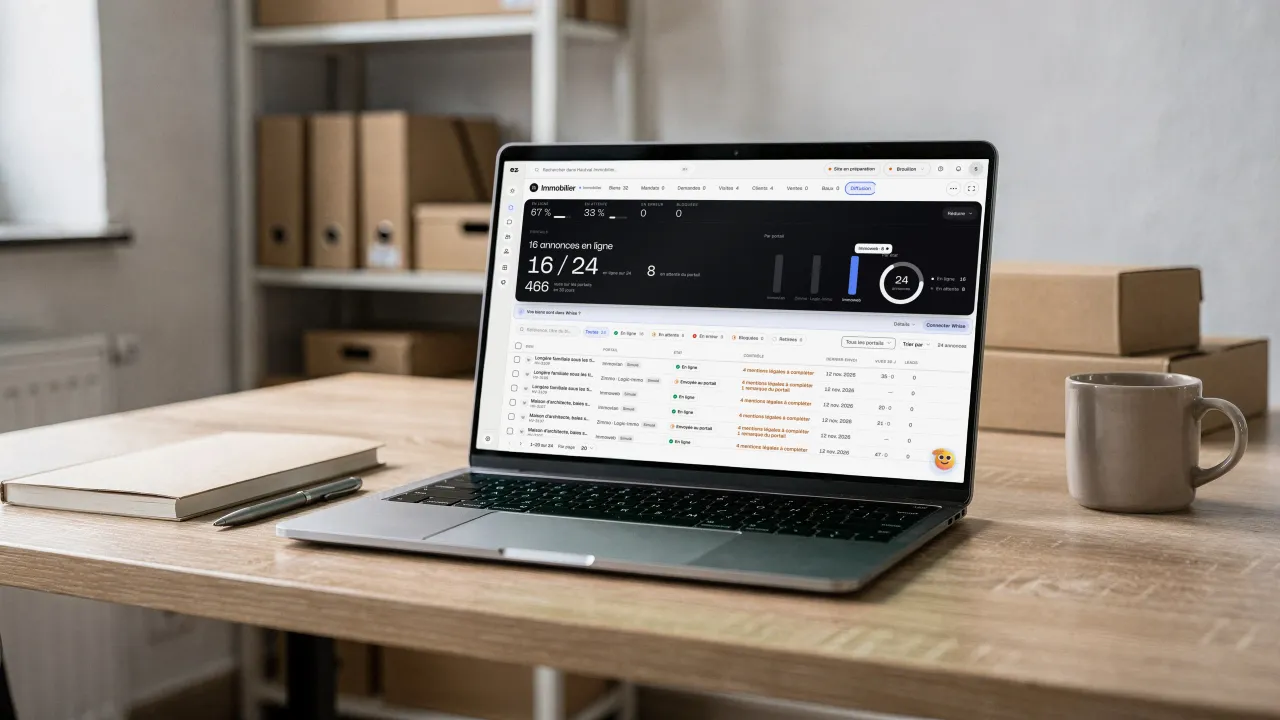
Entered once, published on your website

You enter the property once, then publish it on your website. The distribution screen prepares and checks your listings for the portals, but direct distribution to the portals (Immoweb, Zimmo, Immovlan, Logic-Immo and Immoscoop in Belgium) is not open yet.

A laptop on a wooden desk, binders and boxes behind it, a mug beside it: on screen, Hautval Immobilier's Distribution (in French), 16 of 24 listings live, per portal (Immoweb, Zimmo · Logic-Immo, Immovlan) and the pre-send check of each listing

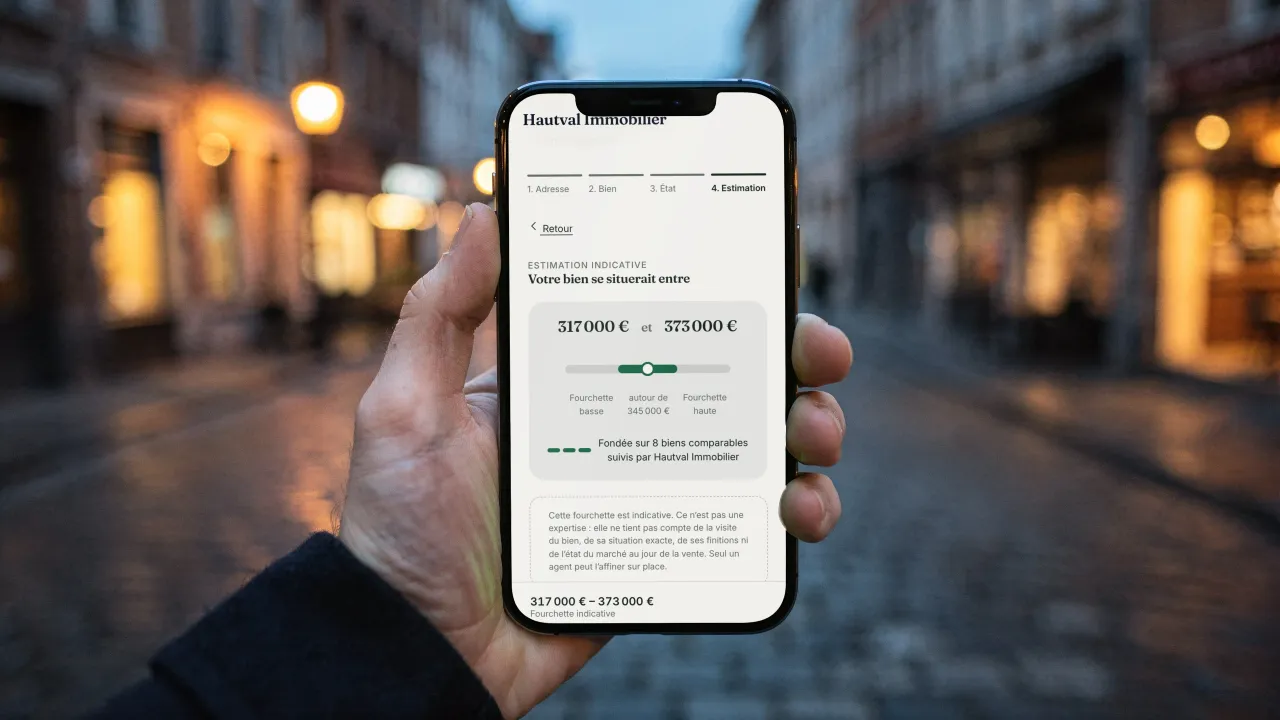
Online valuations bring you sellers

On your website, the owner describes the property in four steps and asks one of your agents for a detailed valuation: the request lands in your software, ready for a call back. The automatic indicative price range currently uses Belgian reference values and is offered for properties in Belgium only.

A phone held in a cobbled street at dusk: on screen, the online valuation on Hautval Immobilier's website (in French), a range of €317,000 to €373,000 based on 8 comparable properties followed by the agency

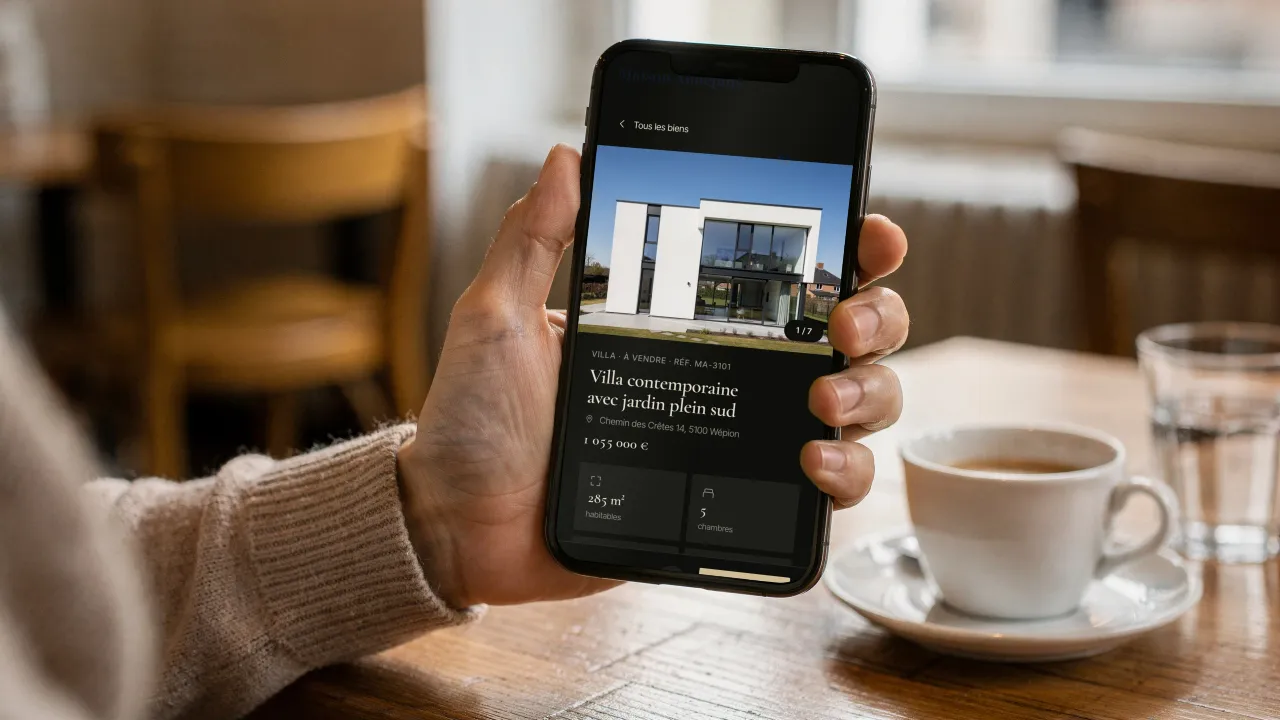
Buyers book their viewing online

Each property page shows the photos, price, floor area and energy rating, with a Visit button. The buyer picks a free slot in your viewing calendar, gets a confirmation and can move the viewing from their client area.

A customer at a café table holds her phone: on screen, a contemporary villa's page on Maison Aubépine's website (in French), its photo, price, floor area, bedrooms and the Visit button

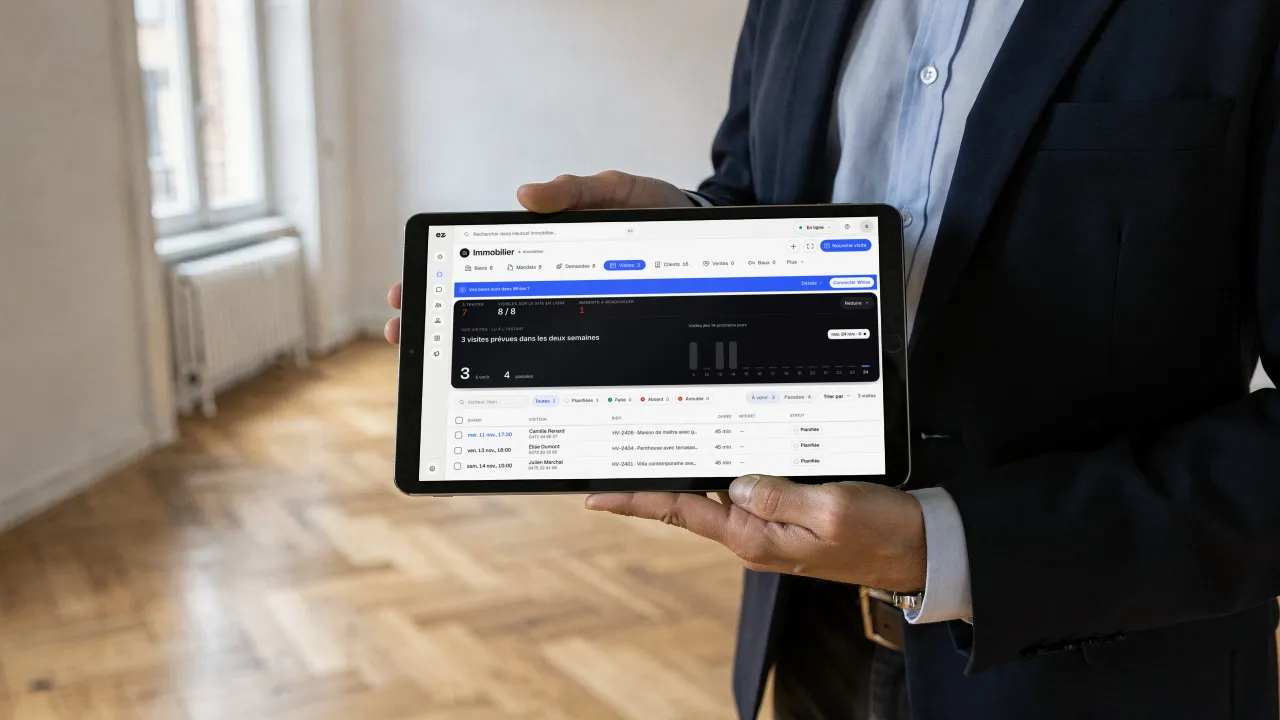
On site, everything fits on a tablet

This week's viewings, the visitor and the property are in front of you. After the viewing, you note the interest and the report; at key handover, the inventory is done room by room, with meters, keys and both parties' signatures.

An estate agent holds a tablet in the empty living room of a renovated flat with herringbone parquet: on screen, Hautval Immobilier's Viewings (in French), 4 viewings planned over the next two weeks, with visitor, property and status

Every property has its full file, right up to the deed

Photos, features, mandate, documents and history sit on the property record. When an offer comes in, you follow the sale from offer to sales agreement and on to the deed, with the agency's commission calculated to the cent.

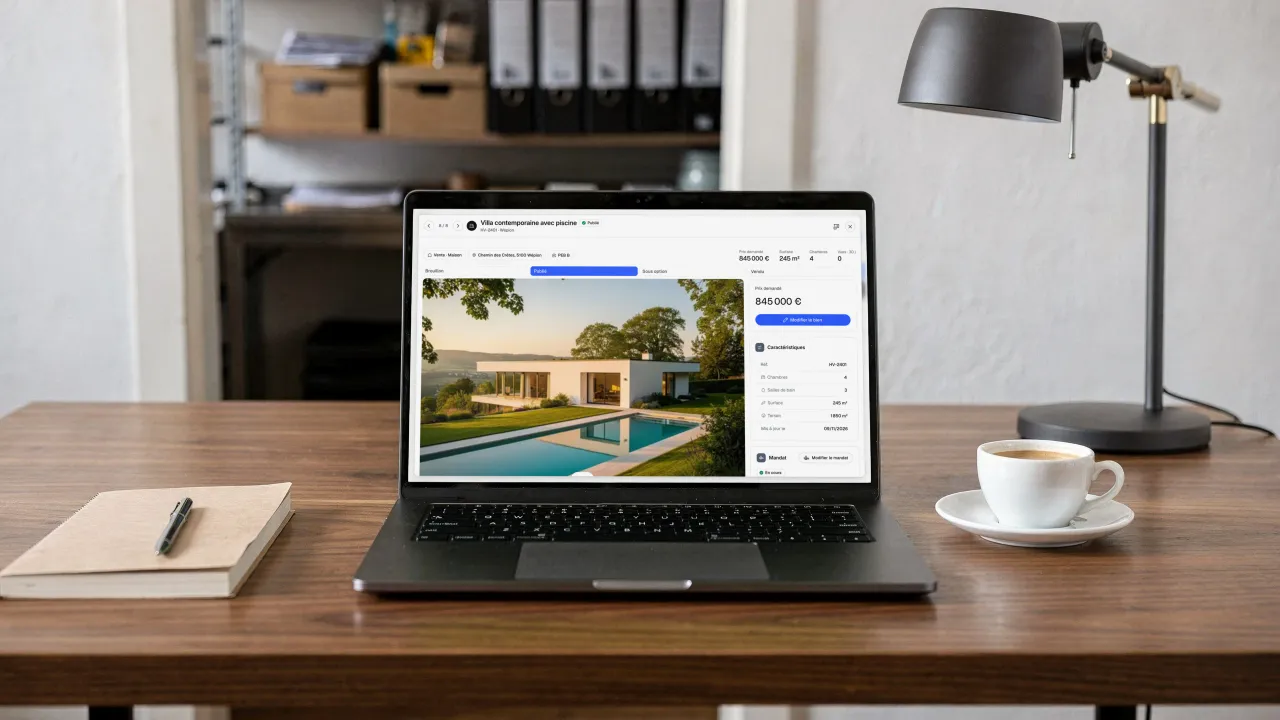
A laptop on the manager's desk, a notebook and a cup of coffee beside it: on screen, the record of the contemporary villa in Wépion at Hautval Immobilier (in French), its photo, its €895,000 price, its features, its Published status and its mandate

Buyers are matched automatically

Each buyer keeps their search: town, budget, bedrooms. As soon as a property matches, its record shows you which buyers to call, and the alert set up on your website lets the buyer know.

Lettings management follows every lease

Leases, rent demands, payments received or rent passed on to the landlord, indexation, inventories and the yearly service charge statement: lettings are managed in the same file as sales.

Switching software? We adapt

The migration imports your properties (even beyond 2,000), your contacts and their history, plus the supported photos and documents; the report flags what was not carried over, to check before you switch. Until you switch, you can turn on a nightly import of changes from Whise into Eazyclick; what you change in Eazyclick is not sent back to Whise.

Questions? We have answers.

View all FAQs

Where do viewing requests go?

In your Eazyclick CRM. Every request sent from a property listing arrives there as a contact linked to the property, with its message, ready for your call back. Visitors can also pick a free slot in your viewing calendar.

Do I need a WordPress plugin to display my properties?

No. Eazyclick websites do not run on WordPress: displaying your properties is part of the website, and we maintain it. You have no extension to update, no bridge to monitor and no theme breaking after an update. If your current website uses WordPress, we transfer its content and redirect its old pages.

Do sold or let properties disappear automatically?

From available properties, yes. When a property is marked sold or let in your software, synchronisation updates your website automatically: the property leaves search and filter results. If you wish, its listing stays accessible, marked “sold”, with comparable properties for buyers who arrived too late.

What if I don't have property software?

No problem. The module also works with direct management: enter your properties from your Eazyclick dashboard, including price, floor area, bedrooms, energy rating, gallery and multilingual description. You get the same filterable showcase with a map and detailed listings. You can always connect software later if you adopt it.

How long before a property goes online?

With automatic publishing, an average of 12 minutes from the change in your software to the live listing on your website. If you prefer to review properties before displaying them, choose staged publishing: properties arrive as previews, and you publish when ready.

Will my properties stay on Immoweb?

Yes. The module does not affect portal listings: Immoweb, Zimmo and Immovlan continue to be supplied by your software as they are today. Your website adds a channel you own, where every enquiry reaches your CRM with the property that interested the visitor.

How much does the Real estate module cost?

The module alone costs € 21/month excl. VAT with a 24-month commitment (€ 24/month over 12 months).

The price, setup included, depends on your setup and is confirmed with your project manager; the subscription costs less per month over 24 months than over 12. The price is per website, regardless of how many properties you publish, and your project manager handles setup. For a complete example including the package, see our estate agency website pricing guide.

Is this module included in a plan?

It is a standard module: one of the 2 included in Spark, and included in Boost. Your project manager helps you choose the modules your business really needs.

Do I need an existing Eazyclick website or pack?

Yes. The property showcase lives on your website: the module can be added to any Eazyclick website, whatever your plan (Spark or Boost), and is managed from the same dashboard. No website with us yet? We put your website and your modules together on a first call.

Already using Whise, Omnicasa or other software?

We adapt. Whise is Belgian CRM software for estate agencies: from Whise, the migration imports your properties, your contacts and their history, with the supported photos and documents, and a nightly import can follow changes until you switch. The Omnicasa connection is coming soon; SweepBright, Zabun and Apimo are not connected yet. In every case, your project manager carries over your properties with you, your contacts import from a CSV file, and you then manage everything in Eazyclick.

Can I import my existing properties and contacts?

Yes. From Whise, the migration imports your properties, your contacts and their history, with the supported photos and documents. From other software, or if you manage properties manually, your project manager helps import them, and your contacts import into the CRM from a CSV file.

What if my agency uses other property software?

SweepBright, Zabun and Apimo are not connected yet: your project manager carries over your properties with you before launch, your contacts import into the CRM from a CSV file, and you then manage your properties in Eazyclick. See what each tool does in our comparison of property software in Belgium.

Arrange your discovery call

Book a call with an expert

30 minutes, zero bullshit. We review your presence, identify the most strategic option for your goals, and tell you exactly what to do next.