Quotes & invoices module

Put together a quote in two minutes, have it signed online, then turn it into an invoice in one click, with its payment link. Reminders go out on their own: you have better things to do than chase unpaid invoices.

Put together a quote in two minutes, have it signed online, and invoice in one click.

A shorter sales cycle, invoices paid sooner

Today, your quotes go out as PDFs from Word or Excel, then you wait. Each invoice takes ten minutes: the right number, VAT, PDF, email, then the spreadsheet. You forget a reminder, a customer pays late and cash flow gets tight.

With the Quotes & invoices module, everything starts from the same dashboard as your website and your CRM. Your customer accepts the quote online, with a signature, and the accepted quote becomes a numbered invoice that goes out with its payment link, by email or as an e-invoice.

The result: an invoice created and sent in thirty seconds, and reminders that go out on their own at D+7 and then D+15 for as long as nothing is paid.

Quotes & invoices is invoicing software ready for e-invoicing: your invoices can go out in a structured electronic format, where your customers require it.

Ideal for getting signatures and payments

From the customer's yes to a paid invoice

You add your lines, VAT and totals are calculated for you. Your customer accepts the quote online, with a signature. The accepted quote becomes a numbered invoice, with its payment link, and reminders go out on their own.

  • VAT and totals calculated without errors
  • Quotes accepted and signed online, with a timestamp
  • Invoice and payment link in one click
First reminder, automatic
D+7
To create an invoice
30 s

Who is Quotes & invoices for?

  • Tradespeople and self-employed professionals
  • Small businesses that invoice customers
  • Frequent late payments
  • E-invoicing

The module in detail

Online quoting and invoicing software: what it does

A professional quote, signed online

Add your line items with quantity, price, VAT and discount: totals are calculated automatically. Your customer opens the quote in their browser and accepts it, adding a drawn signature if they wish. Acceptance is timestamped: you have a clear record of who said yes, and when.

  • Automatic totals
    Totals excl. VAT, VAT and totals incl. VAT are calculated automatically, without errors
  • Online signature
    The customer agrees to the terms and accepts, adding a signature if they wish
  • Timestamped acceptance
    The time, date and connection address are recorded with the acceptance
  • Quote reminders
    Pending quotes are followed up automatically before their expiry date

Invoice in one click, payment through one link

The accepted quote becomes an invoice in one click, with no re-entry. It's sent with a payment link: your customer pays online, with no hidden commission on your revenue. Your reminder rules then run automatically.

  • Legally compliant numbering
    Numbers follow a compliant sequence, with no gaps or duplicates
  • Built-in link
    Your customer pays online in a few clicks, directly from the invoice
  • Set reminders once
    A reminder at D+7, a second at D+15, while the invoice remains unpaid
  • Credit note
    An issued invoice cannot be changed: cancellation requires a credit note

E-invoicing, sending and receiving

Electronic invoicing is becoming the norm between businesses. Your invoices leave in the right format, checked before sending, and your suppliers’ invoices arrive in your workspace, readable and ready for your accountant.

  • E-invoice format
    Every invoice can go out as a structured e-invoice
  • Checked before sending
    Each invoice is validated before it goes, to avoid rejection
  • Supplier invoices received
    List, readable detail, UBL file, PDF and attachments
  • Export for your accountant
    Invoices sent and received, exported for your accountant

Your documents

A quote and an invoice laid out, ready to send

Your logo, your legal details and your terms: the signed quote and the invoice that follows it share the same design.

  • The signed quote

    Lines, quantities, VAT and discount: your client reads it on their phone and signs it online.

  • The invoice that follows it

    The quote's lines, your company numbers and the payment reference: it goes out in electronic format.

From quote to payment

The same file, from sending the quote to receiving the payment

Four screens from Studio Tracé's console, in the order a file goes through them. Nothing is typed in twice from one screen to the next.

  1. The quote goes out

    Three quotes sent are waiting for a signature: Ziggy, Eazyclick's AI assistant, puts them at the top of the page.

  2. The client signs

    The accepted quote keeps its proof: created, sent, viewed, signed, each step dated.

  3. The invoice follows up

    A due date has passed: an email reminder is suggested, you read it over before it goes.

  4. The payment falls into place

    The payment received is recorded on its invoice: all that is left is to match it.

Deposit, balance, reminders

From deposit to final invoice: every payment tracked

An accepted quote can produce a deposit invoice, then a final invoice for the balance. A partial credit note corrects an amount without cancelling the whole invoice. Every payment received is recorded on the invoice, and reminders keep going until it is settled. A repair or a project can also be invoiced without re-entering anything.

From deposit to balance, with no re-entry

From the accepted quote, you issue the deposit invoice, then the final invoice. Amounts come straight from the quote: nothing to copy, and no gap between what was signed and what is invoiced.

  • Deposit invoice
    A percentage or a fixed amount, taken from the accepted quote
  • Final invoice
    The balance, once the deposit has been invoiced
  • Partial credit note
    Corrects part of an invoice without cancelling it
  • Linked to the quote
    Every invoice keeps track of the original quote

Every payment recorded, every reminder scheduled

Customer paying in instalments? Each payment is recorded on the invoice, and you can see what is still owed. You set your reminder steps once, and you can still chase a specific customer yourself.

  • Payments received
    Each payment is recorded on the invoice, even a partial one
  • Automatic reminders
    Steps you define, sent by email
  • Manual reminder
    A reminder sent in one click to the customer you choose
  • Outstanding
    See what is left to collect, invoice by invoice

Invoice a repair or a project

A finished repair or a project tracked on time spent can be invoiced without re-entry. The invoice is created from the work order in the Workshop module, or from a project budget in Projects & time tracking.

  • Work order
    Parts and labour from the order carried onto the invoice
  • Project budget
    A project budget becomes an invoice in one click
  • Customer record
    The invoice joins the customer record in your CRM

The small places that matter

Three places where invoicing gets settled

Pieces of the real console of Studio Tracé, a demonstration design studio: the signed quote, the reminder, the payment.

  • The total, excluding and including VAT

    At the top of the quote: the amount excluding VAT, the total including VAT and the validity date, calculated line by line.

  • What is still due

    The invoice's ring shows the part paid and the balance due, with no sums to do.

  • Every payment linked

    A payment received belongs to its invoice: one click is all it takes to match it.

A tradesman holds a spirit level against a purple wall
A painter holds out her pink roller and a colour chart, in full sun
A decorator shows his fabric samples on a terrace

What you manage

How Quotes & invoices changes your invoicing

Facts about the module, not promises of numerical results.

  • D+7 first automatic reminder, then a second at D+15 while the invoice remains unpaid

  • E-invoicing every invoice sent electronically, checked before sending

  • 30 s to create and send an invoice

What customers say

What our customers say

Very happy with my website built with Eazyclick. The team understood my needs perfectly and created a professional, attractive website that is easy to manage, while staying within my budget. Responsive, personal and efficient service. I highly recommend them to all sole traders!

Dennis Mutton Manager, MAKET
Read their story →

We asked Eazyclick by Caracal to create a new website for our business. Very satisfied with their work and the support throughout the project. First, they immediately proposed a design that reflected our ideas and matched the image we wanted for our company. The website is also very easy to use and intuitive. We really appreciated how responsive and available they were when we had questions. An agency we'd recommend! (translated from French)

Vincent Cordonnier Architect, VMAR Architectes
Read their story →

We entrusted our website design to Eazyclick. The quality of their work surprised us, and they stayed by our side at every stage. From the start, they proposed a design matching our expectations and the image we wanted to convey. As well as being clear and pleasant to browse, the website is easy to manage. We also appreciated their quick replies and availability when we had questions. A great experience!

Martin
See all our reviews
0:00 / 0:00

A week of invoicing

A week at Studio Tracé, from the quote sent to the payment received

  1. Quotes awaiting signature Three quotes are waiting for the client's signature: Ziggy has spotted them.
  2. The accepted quote The visual identity for Torréfaction Marolles: created, sent, viewed, signed.
  3. The overdue invoice Ten days overdue: the email reminder is ready, you read it over.
  4. Every payment matched Payments received, each one linked to its invoice.

Getting started

Your first quotes and invoices in 3 steps

Three steps. No mental load. A module that works for you, not the other way round.

  1. Step 01

    We set up your quotes and invoices with you

    Your project manager sets up your details, your VAT number, your logo and your e-invoicing identity. In one session, your first quote and your first invoice are ready to go out by the book.

  2. Step 02

    You quote, your customer signs

    Create your quote from your dashboard and send it via a secure link in your brand colours. Your customer accepts it online, with a signature, and you can see whether they've opened it.

  3. Step 03

    You invoice, we follow up for you

    The accepted quote becomes an invoice in one click, with its payment link. If the due date approaches without payment, reminders go out on their own. You follow what is outstanding in real time, without a spreadsheet.

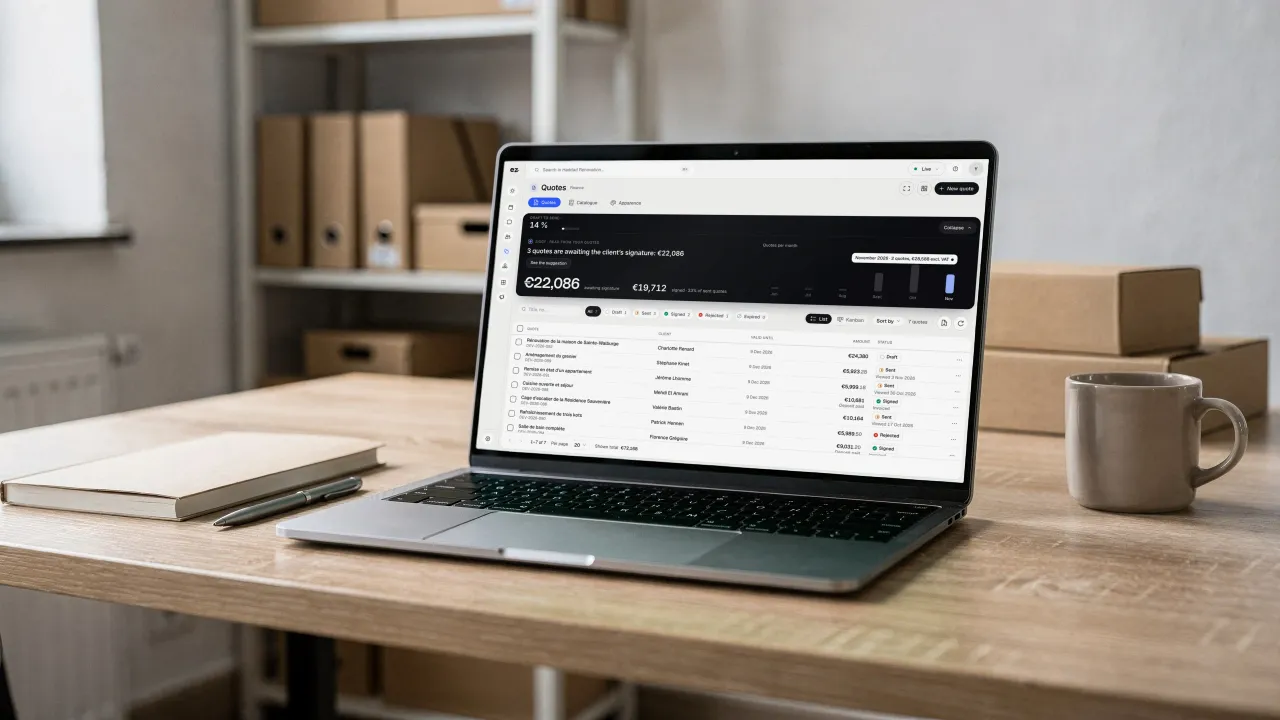
A laptop on a wooden desk, binders and boxes behind it, a mug beside it: on screen, the Quotes awaiting the client's signature and their amount

Quotes & invoices: connected to your tools

  • E-invoicing

    Your invoices sent as e-invoices, checked before sending, and your suppliers’ invoices received.

  • Payment link

    Every invoice is sent with a link to pay online.

  • Accounting export

    An export by period for your accountant; direct connection to their software priced on request.

  • CRM Pro

    The quote is sent from the customer record and its status appears in the pipeline.

  • Projects & time tracking

    Billable time or a project budget becomes an invoice in one click.

  • Workshop

    The invoice is created from the work order, parts and labour included.

What the Quotes & invoices module includes

One of Spark's 2 modules of choice, included in Boost

In a trade pack: one fixed price for all the pack's modules.

What's included

  • Online quote signing and deposits
  • Invoices sent as e-invoices
  • Payment link and automatic reminders
  • Credit notes
  • Monthly export for your accountant
  • Unlimited accounts, no commission on payments received

Which trades is the Quotes & invoices module built for?

The Quotes & invoices module is not limited to one trade. Each page below presents a business that puts it forward: what its website does, the other useful modules and our pricing. Open the one that matches yours to see the module in context.

Three plans. One tool.

Run your business and make it visible: pick the plan that fits your activity, not an imaginary budget.

excl. VAT

Free

Try Spark for free

Start for free

€ 0 for 14 days

Your pack’s Spark modules unlocked, no card needed

After 14 days: read-only account, website still online

Ziggy and help centre

Users
3 during the trial
Standard modules
Your trade’s pack
Premium modules
To discover during the trial
Website
Template website to customise, live on an Eazyclick address

Spark

Run it and be seen

Most recommended

From

€ 71/month instead of € 99

€ 192 less over 24 months than with 12 months

1 h with your project manager every month

Users
3 included, then €11 per user, decreasing
Standard modules
2 included, then decreasing
Premium modules
Optional
Website
4-page website included; 6 pages or more from €19/month, Custom or High-end

Boost

Tailor-made and multi-site

From

€ 620/month instead of € 865

€ 1,680 less over 24 months than with 12 months

2 h with your project manager every month

Users
10 included
Standard modules
Unlimited
Premium modules
Optional, SEO Boost included
Website
High-end, developed to measure

Frequently asked questions

Questions? We have answers.

How do I create a quote that can be signed online?

Build the quote from the customer record, with your line items, VAT and terms, then email it. Your customer opens it in their browser and accepts online, without printing or scanning. Acceptance is timestamped, a deposit can be requested, and the quote becomes an e-invoice in one click.

Is there free quoting software?

Yes: templates and free software from other vendors let you make a quote. Check what they cover: online signature, deposit, e-invoice format, reminders. At Eazyclick, Free is a 14-day free trial of Spark, no card needed; after that, your account turns read-only and your website stays online.

What does e-invoicing change for my invoices?

Electronic invoicing between businesses is becoming mandatory in more and more countries: a PDF sent by email is often no longer enough. The module sends your invoices in a structured format, checked before sending, from the same tool as your quotes.

How much does the Quotes & invoices module cost?

Setup is done with your project manager, who confirms the module's price for your setup; the subscription is lower per month with a 24-month commitment than with 12. Clear pricing, without per-user charges or commission on payments you receive. Accounts in your workspace are unlimited.

Is this module included in a plan?

Quotes & invoices is a standard module: you can choose it among the 2 included in Spark, and it is included in Boost. Your project manager helps you choose.

Do I need an Eazyclick website or pack already?

No. The Quotes & invoices module also works without an Eazyclick website, in a workspace set up by your project manager. With an Eazyclick website, the “Request a quote” button sends every enquiry to your dashboard, ready to price. Not a customer yet? We'll put your plan together on an initial call.

Can I import my existing invoices and customers?

Yes. Your project manager imports your customer list and continues your numbering from where you are, keeping a continuous, legally compliant sequence. Your old invoices remain accessible and your first Eazyclick invoice follows cleanly from the previous ones. Nothing is lost; you keep your history.

Am I ready for e-invoicing?

Yes, for both sending and receiving. Electronic invoicing between businesses is becoming mandatory in more and more countries. The module sends your invoices in a structured format, checked before sending, and your suppliers’ e-invoices arrive in your workspace.

Is online acceptance legally valid?

Yes. When your customer accepts, the action is timestamped and the connection address recorded, along with their drawn signature where applicable. The accepted document is locked and archived. In Belgium, this recorded acceptance constitutes a binding approval by your customer, much stronger than a simple confirmation email.

Does it connect to my accountant?

Yes. Every month, your invoices are included in an export ready for your accountant: no more piecing together a file at the end of the quarter. A direct connection to their accounting software is priced on request: your project manager reviews what works best with you.

Can I cancel or correct an invoice that's already been sent?

An issued invoice can no longer be changed or deleted: that's the law, and it protects your accounts. To correct it, the module issues a credit note that properly offsets the original invoice. While an invoice is still a draft, however, you can edit it freely.

Can I invoice a deposit, then the balance?

Yes. From an accepted quote, you issue a deposit invoice, as a percentage or a fixed amount, then the final invoice for the balance. Amounts come from the quote, with no re-entry. If part of it needs correcting later, a partial credit note adjusts the invoice without cancelling it entirely.

The rules and a worked example are in our guide to the deposit invoice.

Can I receive my suppliers’ e-invoices?

Yes. E-invoices your suppliers send you arrive in your Eazyclick workspace. You find them in a list, with a readable view, the original UBL file, a PDF version and their attachments. An export bundles the invoices received over a chosen period, ready for your accountant.

View all FAQs

Arrange your discovery call

Book a call with an expert

30 minutes, zero bullshit. We review your presence, identify the most strategic option for your goals, and tell you exactly what to do next.