Members area module

A private members area on your website

A private space just for your members

Password-free login, restricted pages, profiles and a directory. One account for your members, everything in one place.

Google 5.0/5

Give your members a private entrance: they log in without a password, you manage everything.

Ideal for clubs

One account, one place

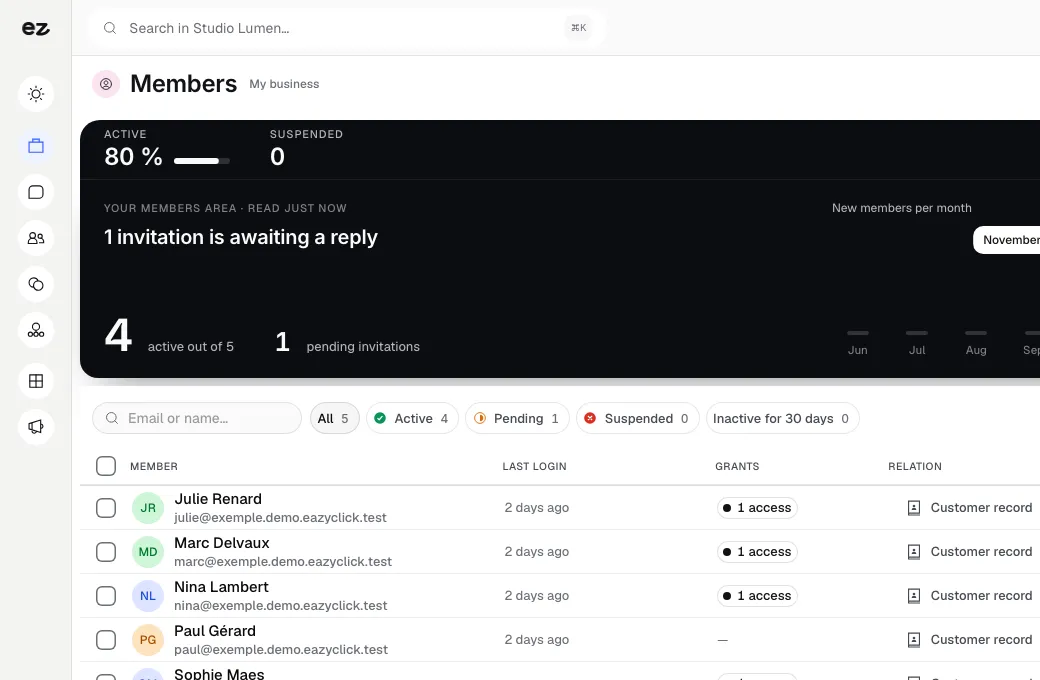
Members log in with one click using a link sent by email. They access restricted pages, edit their profile and browse the directory. You invite, suspend or delete a member from your dashboard.

  • Login through an email link, without a password

  • Restricted pages and sections, marked in the editor

  • Member directory with photos and introductions

0

Password

+45 %

Active monthly logins

A professional private space, without passwords to manage

You want to reserve pages, documents or prices for members, but your website is open to everyone. So you improvise: a shared folder, a common password, a membership spreadsheet.

With Members area, members log in through an email link, access restricted pages, edit their profile and browse the directory. You decide which pages stay private.

The result: one account brings together content, orders and appointments, no password to remember, and 45% more active monthly logins after activation.

Who is Members area for?

  • Non-profit organisations (ASBLs) and associations
  • Membership clubs
  • Service providers with regular customers
  • Websites with restricted content
Book a free call

Password-free login

Members enter their email and receive a secure login link: one click, and they are in. No password to create, remember or reset, so fewer people give up. Every access is logged.

  • Secure link
    Enter an email, receive a link, click once and the member is logged in
  • Long sessions
    The session stays active for several weeks, with no need to log in on every visit
  • Optional password
    Those who prefer a password can still create one
  • Revocable access
    Every access is logged, and you can revoke it in one click

Restricted pages and personal space

Mark any page, or just a section, as members-only from the editor. Members get a “my account” dashboard bringing together everything relevant to them. One account, one place.

  • Restrict access in the editor
    Make a whole page or a single section private in one click
  • An invitation, not an error
    Visitors who are not logged in see an invitation to log in, never an error
  • My account dashboard
    Profile and restricted content together in one dashboard
  • Modules together
    Orders, appointments and membership appear according to the modules you use

Directory and member management

Activate a directory where members can choose to appear with their name, photo and a short introduction. Keep control of your community from your dashboard. You remain GDPR-compliant.

  • Opt-in directory
    Name, photo and short introduction, only if the member wishes
  • Login tracking
    The member list shows the last login date
  • Access in one click
    Invite, suspend or delete a member from your dashboard
  • GDPR-compliant
    Manage your community's data in compliance with the GDPR

Our customers build stronger community loyalty. The numbers prove it.

No empty promises. Measured results, project after project.

See all our reviews

Your members area ready in 3 steps

Three steps. No mental load. A module that works for you, not the other way round.

View all modules
Step 01

We activate Members area on your website

Your project manager sets up member login and private pages on your existing website. You define your profile fields and directory policy. Everything is managed from your single dashboard.

Step 02

Your members log in with one click

They enter their email, receive a link and access their personal space. You mark pages and documents as restricted, and invite members individually or in bulk. No passwords to manage.

Step 03

You manage your community

From the console, track who is active, grant or revoke access, and suspend or delete a member in one click. Members find their content, orders and appointments in one place, depending on the modules you use.

Modules that build on your members area

Every module you activate strengthens the others

Courses & paid content

Customer relationships

Your courses live on your website.

Sell access to your courses and resources: members buy, log in and find their content in their space, without an extra account.

Discover

Donations & memberships

Customer relationships

Every euro donated reaches your account.

A paid membership automatically opens the members area: payment and private access work as one.

Discover

What the Members area module includes

Included in Spark (1 of the 2 modules of your choice) and in Boost

In a trade pack: one fixed price for all the pack's modules.

What's included

  • Member login, restricted pages and directory
  • No per-member fees
  • Support from your project manager

Which trades is the Members area module built for?

The Members area module is not limited to one trade. Each page below presents a business that puts it forward: what its website does, the other useful modules and our pricing. Open the one that matches yours to see the module in context.

Three plans. One tool.

Run your business and make it visible: pick the plan that fits your activity, not an imaginary budget.

excl. VAT

Free

Try Spark for free

Start for free

€ 0 for 14 days

Your trade’s pack on trial, no card needed

After 14 days: read-only account, website still online

Ziggy and help centre

Users
3 during the trial
Standard modules
Your trade’s pack
Premium modules
To discover during the trial
Website
Template website to customise, live on an Eazyclick address

Spark

Run it and be seen

Most recommended

From

€ 71/month instead of € 99

€ 672 less over 24 months than with no commitment

1 h with your project manager every month

Users
3 included, then €11 per user, decreasing
Standard modules
2 included, then decreasing
Premium modules
Optional
Website
4-page website included; 6 pages or more from €19/month, Custom or High-end

Boost

Tailor-made and multi-site

From

€ 620/month instead of € 865

€ 5,880 less over 24 months than with no commitment

2 h with your project manager every month

Users
10 included
Standard modules
Unlimited
Premium modules
Optional, SEO Boost included
Website
High-end, developed to measure

Further reading

Documentation

Questions? We have answers.

View all FAQs

How much does Members area cost?

The module alone costs € 21/month excl. VAT with a 24-month commitment (€ 24/month over 12 months).

The price, setup included, depends on your setup and is confirmed with your project manager; it is lower per month with a 24-month commitment than with 12. Setup covers member login, private pages and the directory on your website. The price is fixed per website, with your project manager's support included. No fee per member.

Is this module included in a plan?

It is a standard module: one of the 2 included in Spark, and included in Boost. Your project manager helps you choose the modules your business really needs.

Do I already need an Eazyclick website or plan?

Yes. The private area lives on your website: it can be added to any Eazyclick website, whatever your plan (Spark or Boost). Your members’ identity is shared with your other modules: one account for everything. No website with us yet? We put your website and your modules together on a first call.

Can I import my existing member list?

Yes. Invite members in bulk: they receive a login link and join the space without creating a password. If you have a membership file, your project manager helps transfer it properly. Members then find their profile, access rights and, depending on the active modules, their history in one place.

Do my members need to create a password?

No. Members sign in through a link sent to their email address: one click is enough, with no password to remember or reset. Those who prefer can still choose a password, but it is never mandatory. It is the simplest way to provide access to a private area.

Can I restrict just certain pages to members?

Absolutely. In the editor, choose page by page, or even section by section, what is public or members-only. Visitors who aren't logged in see an invitation to sign in, never a dead end. Keep your brochure website open while reserving documents, prices or exclusive resources for members.

Is it GDPR-compliant?

Yes. You retain full control of your members' data: suspend, delete or export an account, and the directory only displays members who have agreed. Every action is logged in your dashboard. Members' data remains yours, in your space, without being sold or shared elsewhere.

Arrange your discovery call

Book a call with an expert

30 minutes, zero bullshit. We review your presence, identify the most strategic option for your goals, and tell you exactly what to do next.