The service end to end

A service at Maison Lavaux, from booking to closing

  1. The booking comes in Arnaud Pirard books online for two: the booking lands in Reservations, with its table.
  2. The table waits on the plan On the floor plan, T7 is reserved in his name. The server taps it when the guests arrive.
  3. Another area, in one move Main room, terrace, private room: one tab per area, each with the tables that are waiting.
  4. The order taken at the table One dish per cover, in its course. A long press adds a note: “medium rare, sauce on the side”.
  5. The kitchen receives, the table waits Starters go to the kitchen, mains and desserts wait their turn. Once ready, T7 turns “to serve”.
  6. Send the next course The starters are served: with one tap, the server sends the mains to the kitchen.
  7. The bill split Everyone pays their part: per person, by item, in equal shares or by amount.
  8. Settled at the table, several ways Meal vouchers and cash for one, card and a tip for the other: the change is worked out, the receipt follows.
  9. Cleared, then free Settled, T7 turns “to clear”. “Table ready”, and it waits for the next guests.
  10. The evening closing At closing, the Z report counts the floor apart from the counter: covers, average spend, tips per server.

One single flow

From booking to closing, one story per table

Each module does its part of the service and hands over to the next. Nothing is typed twice: what one records, the others see straight away.

  1. Reservations

    The booking comes from the website, the phone or the team, with the name, time and covers. It lands on its table.

  2. Floor

    The server sees the reserved table on the plan, opens it in one move when the guests arrive and takes the order.

  3. Menu

    Dishes, prices and options come from your menu: the same as on your website and at the table's QR code.

  4. Kitchen

    Each course reaches its station. When it is ready, the table turns “to serve” on the server's plan.

  5. Point of sale

    The bill is split and settled at the table. In the evening, the closing counts the floor apart from the counter.

Reservations, Floor, Menu, Kitchen and Point of sale share the same table, the same order and the same bill.

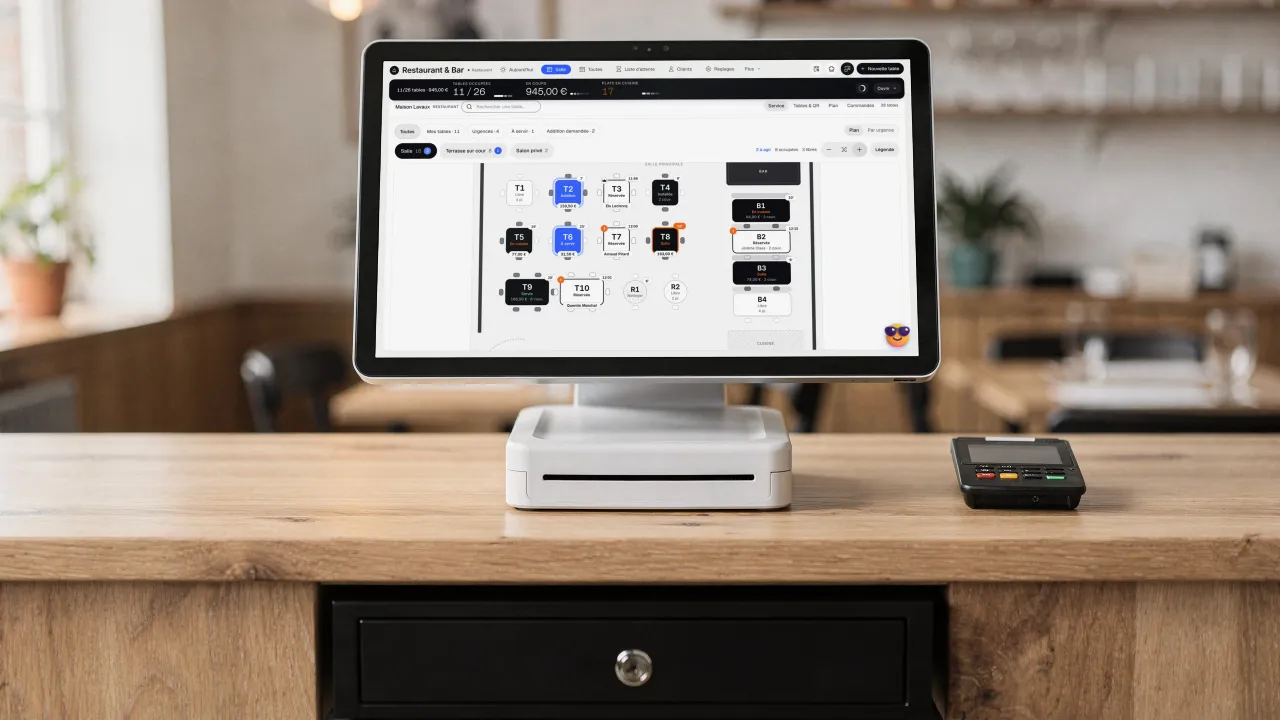
A point-of-sale terminal on a restaurant counter, the cash drawer below and a payment terminal beside it: on screen, Maison Lavaux's floor plan, square and round tables and banquettes, each with its status

Floor management module

Your tables live on a floor plan, orders taken on a phone or a tablet and sent to the kitchen and the bar station by station, then the bill split and settled at the table. It all happens in Reservations, next to your bookings and your menu.

The whole floor on one screen

What your servers used to jot on a pad, the floor now keeps

Floor management connects your tables, your menu and your kitchen. The server opens the table, takes the order on a phone or tablet, then sends it: the kitchen and the bar each receive what concerns them, course by course. Several servers work at the same time, and each one sees every table.

At the end of the meal, the bill is split by item, in equal shares or by amount, and every payment is recorded on it: cash with change, card, meal vouchers, Payconiq or TWINT depending on your country. Tips are counted separately, server by server.

Ideal for table service

From floor plan to bill

Every table has its status, its order and its bill, seen by the whole team at the same time.

  • Live table plan, with status and timer
  • Orders by course, sent station by station
  • Bill split and settled at the table
of a table followed live
8 states
to split the bill
3 ways

Who is floor management for?

  • Restaurants and brasseries with table service
  • Pizzerias and bistros that want to serve faster
  • Bars serving indoors and on the terrace
  • Teams of several servers sharing the tables

The module in detail

What floor management actually does

Service is followed table by table, from the first cover to the table ready again.

The floor plan, live

Every table shows its status: free, reserved, ordered, served, to clear. The timer shows how long the table has been waiting, and tonight's booking appears on it with the name and the covers. On a phone, the same floor reads by urgency.

Orders taken at the table

The server taps a dish to add it; a long press opens its options, such as how a steak must be cooked. Each dish goes to a cover and a course, a note can be added, then the order is sent. Prices come from your menu.

The kitchen and the bar, each at its station

The order goes to the right station: dishes to the kitchen, drinks to the bar, on the kitchen screen filtered by station. Desserts stay "to follow" until the server sends the next course from the table's card.

The bill split and settled at the table

By item, in equal shares or by amount: everyone pays their part. Cash with the change worked out, card, meal vouchers, Payconiq or TWINT depending on your country: every payment is recorded on the bill, tip included. Taking payment at the table comes with the Point of sale module.

The service screen, point by point

The service at a glance

Maison Lavaux's floor screen, as the team sees it during service.

  1. The service in one sentence

    Tables in use, what is running and the dishes in the kitchen, read right now.

  2. Time spent at the table

    The service average and the longest-sitting table.

  3. My tables, the urgent ones

    Each server finds their own tables; urgent ones come first.

  4. Every table, its status

    Free, ordered, served: the timer shows since when.

Day to day

A service that holds, even at peak times

What prevents mistakes and forgotten tables.

  • Several servers, no table twice

    Each server finds their own tables and sees everyone else's. If two servers open the same table in the same second, only one opening goes through.

  • Move, join, offer

    A table moves, two tables are joined, a dish is on the house: the action is shown before it is confirmed, and a discount above your threshold asks for a manager's code.

  • A closing that adds up

    With Point of sale, the end-of-day closing waits until every table is settled. It then shows the floor apart from the counter: covers, average spend per cover and tips per server.

Getting started

Your floor ready in 4 steps

From your table plan to the first service.

  1. Step 01

    Draw your floor

    Your areas, your tables and their covers: the Reservations plan also runs the service.

  2. Step 02

    Sort your menu by station

    Each menu category goes to its station, kitchen or bar, and the dishes get their options.

  3. Step 03

    Add your team

    Server, head waiter or manager: each has their role, on their own phone or on the floor tablet.

  4. Step 04

    Serve

    Open a table, take the order, send it. Taking payment at the table comes with the Point of sale module.

What the Floor management module includes

A feature included in another module, with no price of its own

What's included

  • Live floor plan and the status of every table
  • Orders at the table on phone and tablet
  • Sent to the kitchen and the bar, course by course
  • Bill split by item, in shares or by amount

Included in: Table ordering & kitchen display

Payment at the table (cash, card, meal vouchers, Payconiq, TWINT) and the end-of-day closing come with the Point of sale module.

Three plans. One tool.

Run your business and make it visible: pick the plan that fits your activity, not an imaginary budget.

excl. VAT

Free

Try Spark for free

Start for free

€ 0 for 14 days

The full Spark plan with your trade’s pack, no card needed

After 14 days: read-only account, website still online

Ziggy and help centre

Users
3 during the trial
Standard modules
Your trade’s pack
Premium modules
To discover during the trial
Website
Template website to customise, live on an Eazyclick address

Spark

Run it and be seen

Most recommended

From

€ 71/month instead of € 99

€ 192 less over 24 months than with 12 months

1 h with your project manager every month

Users
3 included, then €11 per user, decreasing
Standard modules
4 included, then decreasing
Premium modules
Optional
Website
4-page website included; 6 pages or more from €19/month, Custom or High-end

Boost

Tailor-made and multi-site

From

€ 620/month instead of € 865

€ 1,680 less over 24 months than with 12 months

2 h with your project manager every month

Users
10 included
Standard modules
Unlimited
Premium modules
Optional, SEO Boost included
Website
High-end, developed to measure
1 h / 2 h /month
Project manager
With Spark and Boost: your questions, a setting, a short training.
4 modules
Modules
Included in Spark, then tiered. Premium ones à la carte.
12 or 24 months or no commitment
Commitment
Spark: € 71 over 24 months, € 79 over 12, € 99 with no commitment. Boost: € 620, € 690 and € 865. Free: no commitment.
From € 0
Setup
Free if you do everything with Ziggy, Eazyclick’s AI assistant, and the help centre.

Frequently asked questions

Questions? We have answers.

How much does floor management cost?

It comes with the Table ordering module: it has no price of its own. Payment at the table is added with the Point of sale module. Hardware is not included: the floor runs on the phones and tablets you already have.

Do I need to install an app?

No. The floor opens in the browser of the phone or tablet, like the rest of Eazyclick.

Can several servers work at the same time?

Yes. Every server sees all the tables and finds their own in one tap. A table opened by one server cannot be opened a second time by another.

Is my card terminal connected?

Not directly yet. You take payment on your usual terminal and the payment is recorded on the bill. A direct link with card terminals is being prepared.

What if the network drops during service?

The floor keeps the server's last actions during a short outage and sends them as soon as the connection comes back.

Does the kitchen get a printed ticket?

Not yet: the kitchen and the bar receive the order on the kitchen screen, filtered by station. Kitchen printing is planned.

View all FAQs

Arrange your discovery call

Book a call with an expert

30 minutes, zero bullshit. We review your presence, identify the most strategic option for your goals, and tell you exactly what to do next.