Skip to the steps
Google 5.0/5

From sign-up to Spark, step by step

Your VAT number is enough.

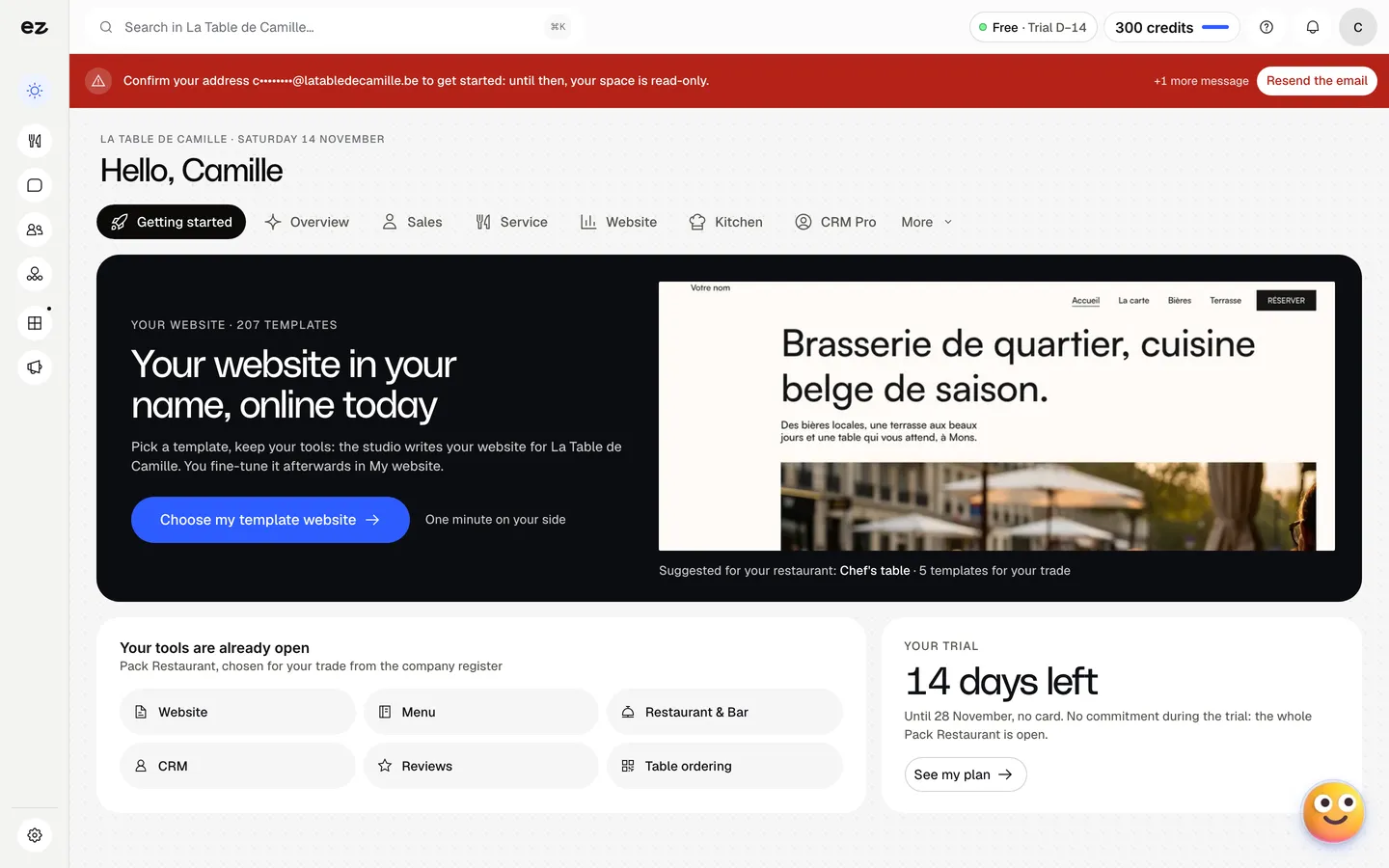
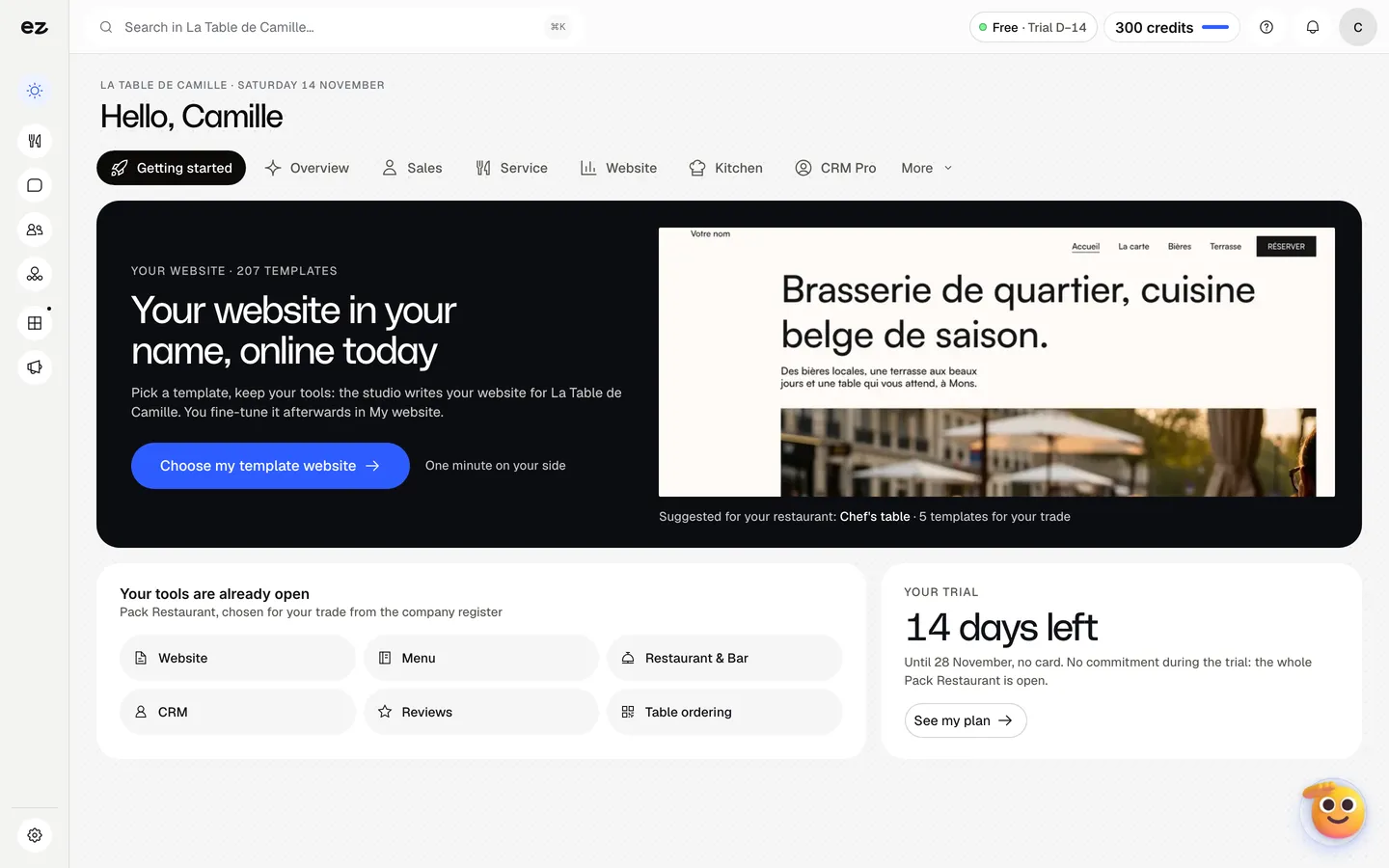
Home screen of the confirmed account: the restaurant pack’s tools are open and the trial counts 14 days.

Your trade’s pack, open from the first minute. Real screen · demo data

01 · Your VAT · Day 1

Your VAT number is enough

Your business recognised, you confirm the trade.

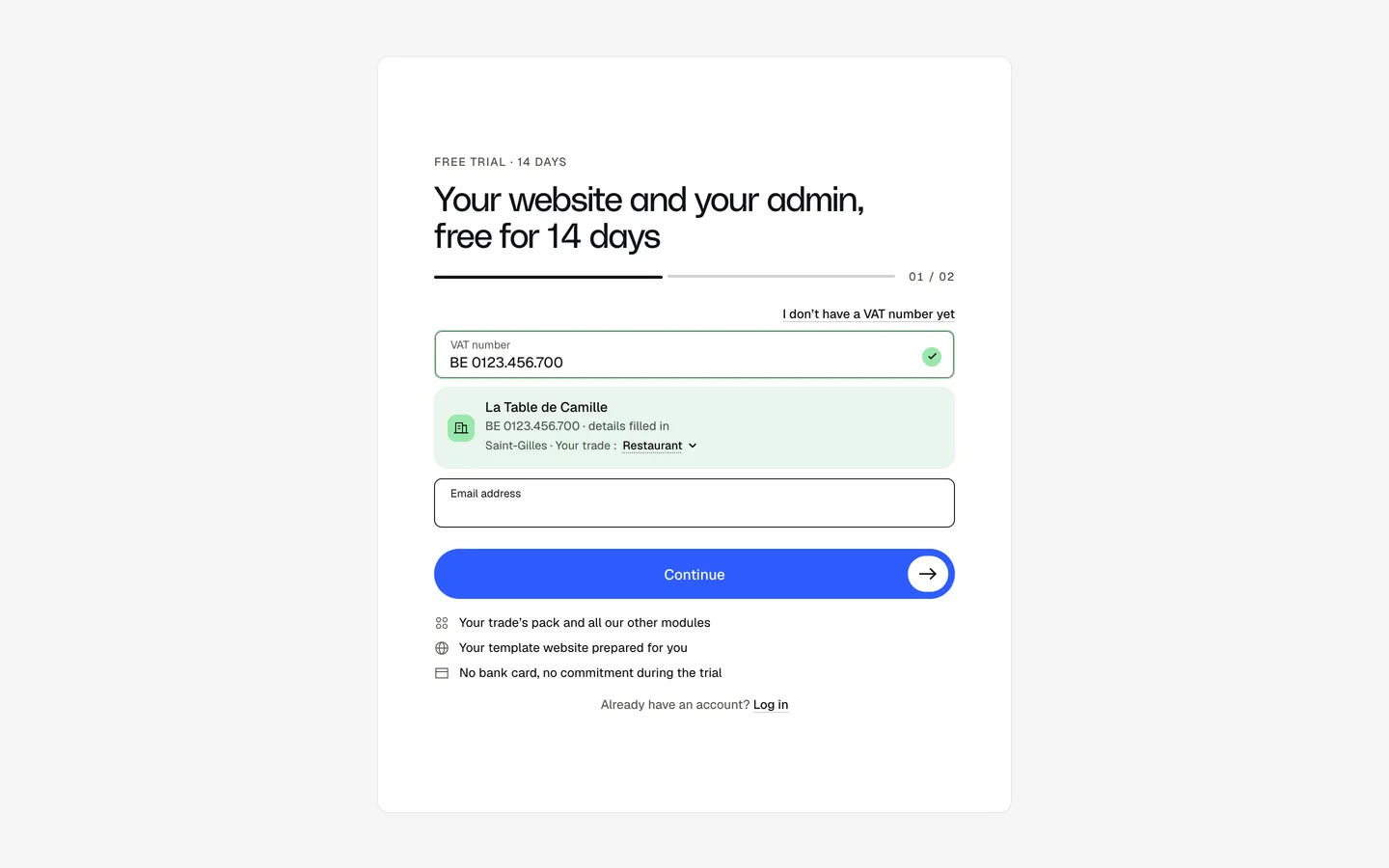
  1. Your VAT and your email

    One field for the VAT number, one for the email, nothing else.

  2. Your business, recognised

    Your company’s record appears, name and address filled in.

  3. Your trade, suggested or picked

    In Belgium the trade is suggested from your activities; keep it or change it. It opens the right pack.

  4. First name, last name, phone

    First name, last name, phone, then create your free account.

Do I have to fill in a long form?

One form, in two steps. First your VAT number and your email: we find your business in the EU VAT register, name and address filled in. In Belgium your trade is suggested from your activity codes at the company register; elsewhere you pick it from the list. Then your first name, last name and phone: that’s all. No card, no commitment.

Good to know
Free and without commitment. No VAT number yet? The link under the field lets you start anyway.

A question before you start? Someone from the team can go through it with you.

Eazyclick sign-up screen: the VAT number BE 0123.456.700 is recognised, the record “La Table de Camille, Saint-Gilles” appears with the suggested trade: restaurant.
The business recognised, the trade suggested. Demo data. Real screen · demo data

02 · Your account · Day 1

You are already in your account

One click in the email, and everything opens.

  1. You’re in, read-only for now

    Your home screen, with the banner asking you to confirm your address.

  2. One click in the email

    The confirmation email arrives at once; you choose your password right after.

  3. Your account opens fully

    The banner goes: you can publish and send.

And then, do I have to wait?

No waiting screen: you go straight into your account, in your business’s name, with your trade’s pack already open. One click in the email you receive confirms your address. Until then your account stays read-only: nobody can publish or send in your name.

Good to know
The link in the email is valid for 7 days and works only once.

You move at your own pace: on your own, or with one of us alongside you.

Home screen of the “La Table de Camille” account: red banner asking to confirm the address, card “Your site in your name” and the restaurant pack already open.
Your home screen, right after sign-up. Real screen · demo data
A waitress carries two plates onto a sunny terrace
A hairdresser blow-dries a client’s hair in her salon
An architect at his scale model and plans

03 · Ziggy · Day 1

Ziggy by your side, every day

Your trade’s pack, and Ziggy for your questions.

Ziggy

Your next three actions

  1. Confirm your email address
  2. Choose your template site
  3. Fill in your menu or services
  1. Your trade’s pack, already open

    Your tools are already open: the pack chosen for your trade.

  2. Ziggy answers your questions

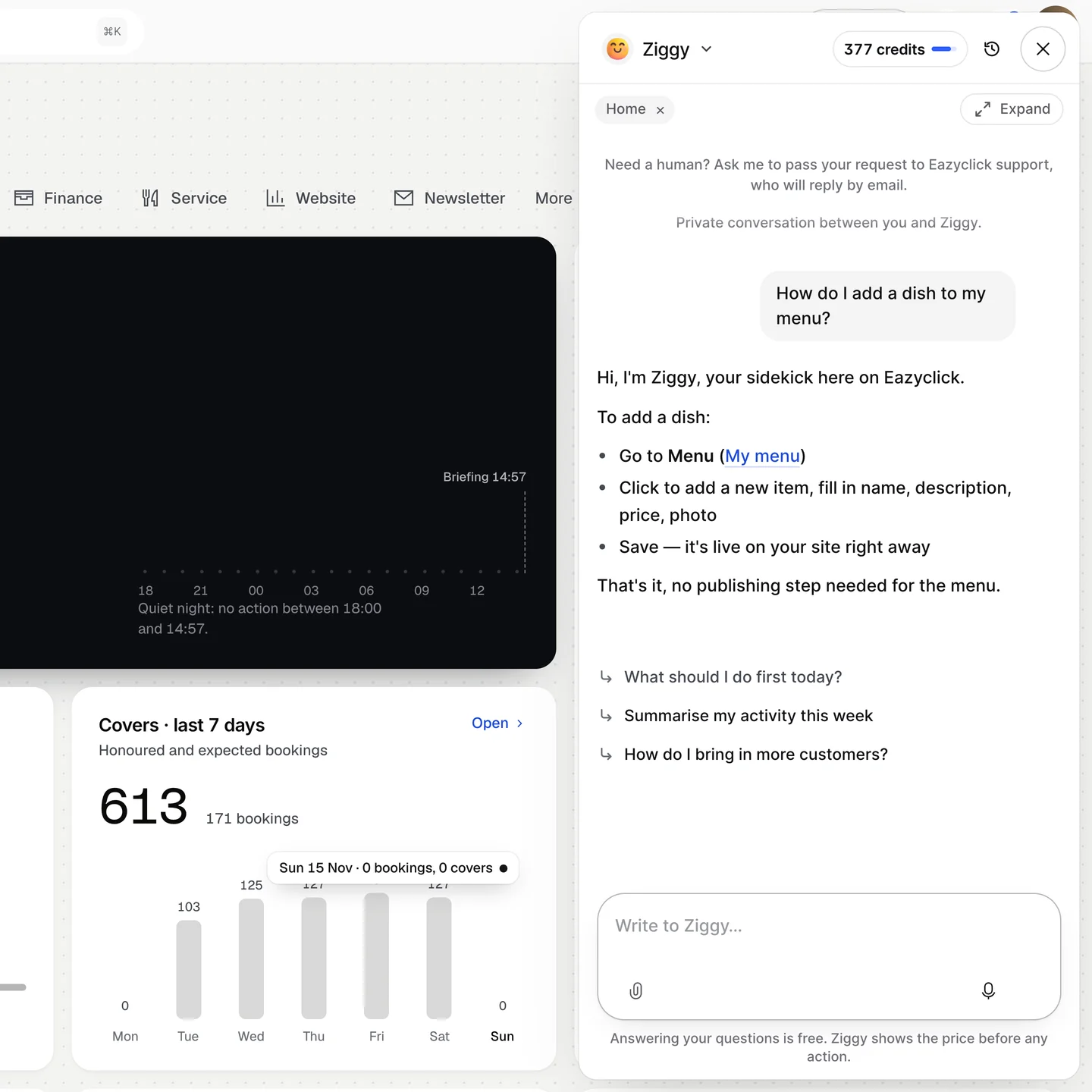
    One click on his face, bottom right: Ziggy opens and suggests his first questions, up to booking a call with an adviser.

Where do I start?

From the first moment, your home screen shows the modules of your trade’s pack, and My project your next actions. Ziggy, the Eazyclick AI assistant, stays at the bottom of the screen: one click and he answers your questions about your site, your plan or your prices. Your pack is one of 66 trade packs at a fixed price: for a restaurant, the website, the menu, Restaurant & Bar, the CRM, reviews and table ordering.

Good to know
300 credits come with the trial. Nothing is applied without your click, and advice questions to Ziggy are free.

Torn between two packs? An expert can choose with you.

Ziggy answers your questions: its panel opens on the right of your account, with its first suggestions. Here, he explains how to add a dish to your menu.
Ziggy answers your questions Real screen · demo data

04 · Template site · Same day

Your template site, written for you

207 templates, the studio writes, you fine-tune in My site.

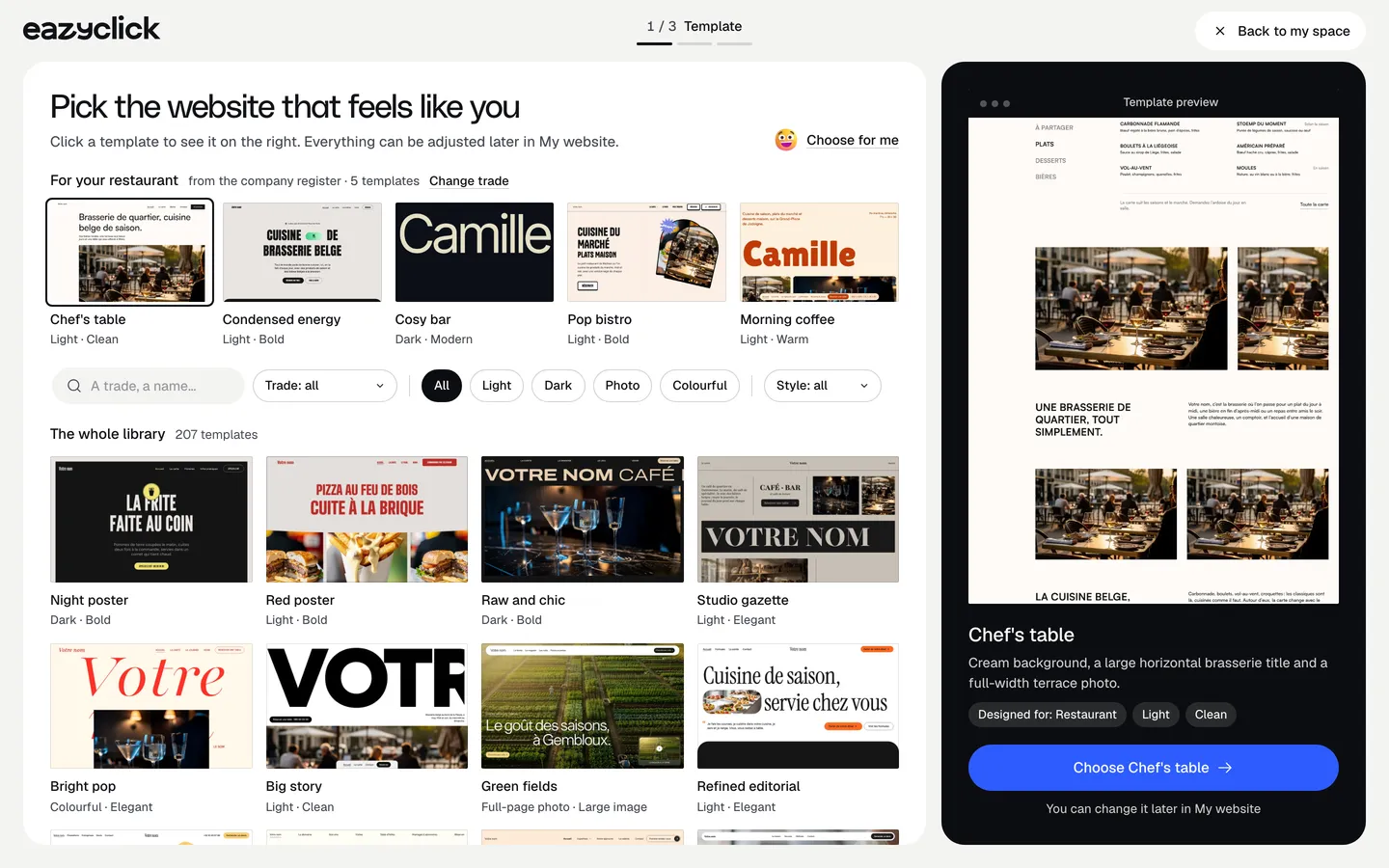
  1. Your trade’s templates first

    For a restaurant: 5 template sites, then the whole library.

  2. The preview, as it will go live

    Click a template to see it large; click again and it is yours.

  3. The studio writes your site

    Your site is in the studio’s queue: nothing is expected from you.

  4. While your site is being written

    My project suggests what comes next: your menu, your photos, your bookings.

What about my website?

Choose from 207 template sites, your trade’s first, or let Ziggy choose for you. The studio writes your site in your name: it is ready within the day, often much sooner, and an email lets you know. You then fine-tune it in My site and publish when you are ready: on an Eazyclick address with Free, on your own domain with Spark.

Good to know
While the studio writes, you already fill in your menu, opening hours or contacts. The first preparation costs no credit.

Your texts, your photos: an expert can review them with you.

Template site gallery: 5 templates for a restaurant, then the whole library of 207 template sites.
The gallery: your trade’s templates first. Real screen · demo data
A florist holds a bouquet outside her shop
A physiotherapist treats a patient in her practice
A waitress takes two customers’ order

05 · Your tools · Day 1 → 14

14 days to try your tools

Till, shop, appointments: no card.

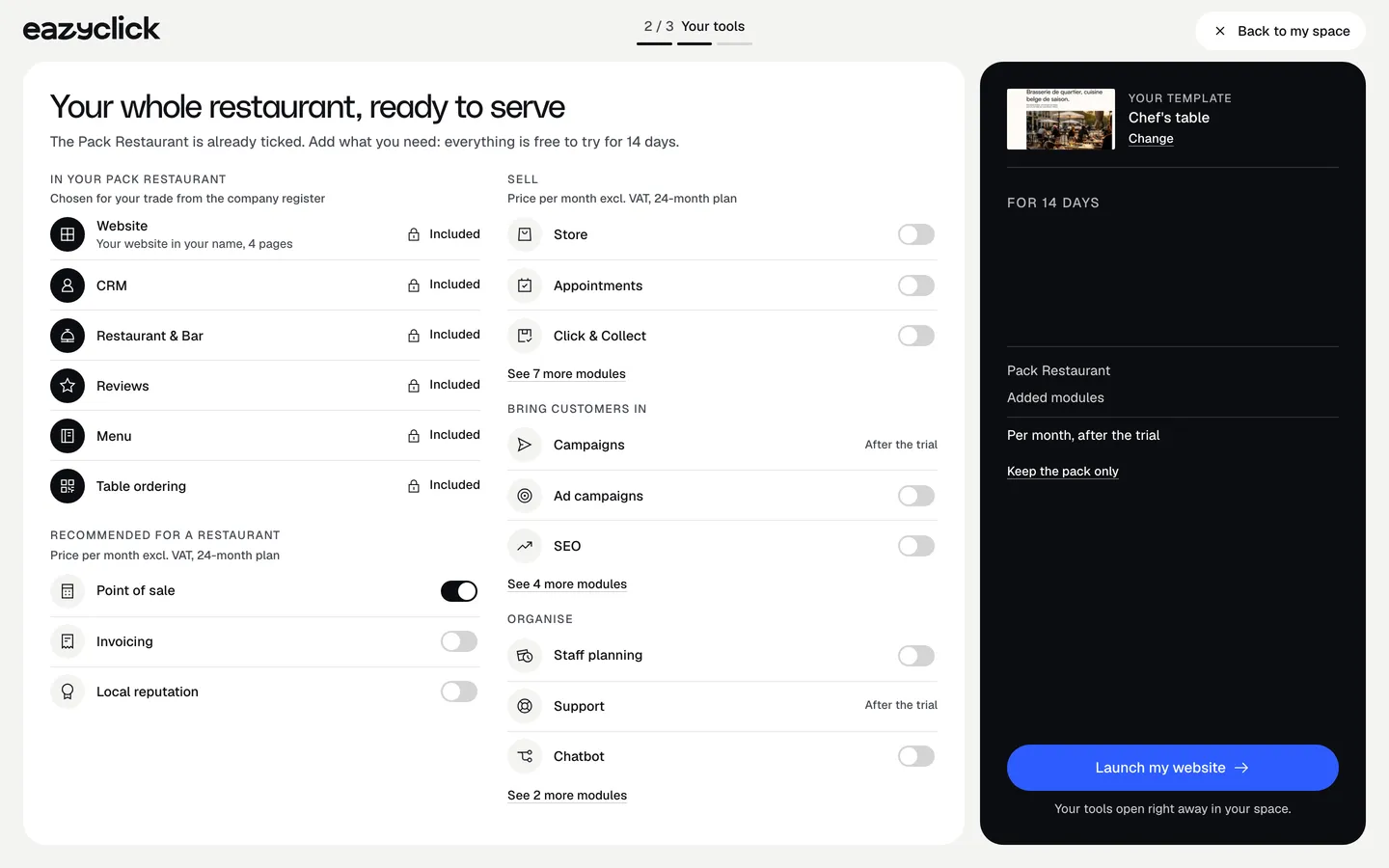
  1. Your trade’s pack, already ticked

    In your pack, every module is included.

  2. The till, added in one click

    One switch adds the till, the online shop or appointments to your trial.

  3. 14 days, no card

    The trial countdown, in My project.

What can I try?

Your trade’s pack is already ticked, and open for the whole trial. Add what you need, the till, the online shop, appointments: your modules run with your real customers and products. Customers, quotes, appointments and sales: from first contact to invoice, everything in one place.

Good to know
Mail, campaigns, support desk and AI agents open with Spark.

An expert can set up your modules with you, around the way you work.

“Your tools” screen: the restaurant pack already ticked, every module included, and the till added with its switch. Amounts hidden.
Your tools: the pack ticked, the till added in one click. Amounts hidden. Real screen · demo data

06 · Spark · Day 15

Move to Spark, without losing a thing

From € 71 excl. VAT a month, or Boost with an expert.

Prices excl. VAT

Free

Try Spark for free

Start for free

€ 0 for 14 days

Your trade’s pack on trial, no card needed

After 14 days: read-only account, website still online

Ziggy and help centre

Users
3 during the trial
Standard modules
Your trade’s pack
Premium modules
To discover during the trial
Website
Template website to customise, live on an Eazyclick address

Spark

Run it and be seen

Most recommended

From

€ 71/month instead of € 99

€ 672 less over 24 months than with no commitment

1 h with your project manager every month

Users
3 included, then €11 per user, decreasing
Standard modules
2 included, then decreasing
Premium modules
Optional
Website
4-page website included; 6 pages or more from €19/month, Custom or High-end

Boost

Tailor-made and multi-site

From

€ 620/month instead of € 865

€ 5,880 less over 24 months than with no commitment

2 h with your project manager every month

Users
10 included
Standard modules
Unlimited
Premium modules
Optional, SEO Boost included
Website
High-end, developed to measure

Talk to an expert

Rather talk it through in person? Book a 30-minute call or ask to be called back within 1 working day. The adviser starts from an estimate based on your pack. Ziggy also offers the call as soon as you ask to talk to someone.

Your project manager makes the move to Spark with you.

And if you wait?

On day 15 without a subscription, the trial stops: your data stays viewable, read-only, and your site stays online, nothing is deleted or charged.

And after the 14 days?

Your own domain, 2 standard modules included, 3 users and 1 h a month with your project manager, from € 71 excl. VAT a month (24-month commitment). Need more? Boost from € 620 excl. VAT a month, with an expert by your side.

How it works · In short

From sign-up to Spark, in brief

Your VAT number is enough: your account opens with your trade’s pack, and Ziggy, the Eazyclick AI assistant, answers your questions and can pick your template site for you. Try your modules for 14 days, talk to an expert, then move to Spark.

Questions

What people ask us before they start

Do I need a VAT number to sign up?

The VAT number is the first field: it lets us recognise your business and suggest your trade. No number yet? The link under the field lets you start anyway.

Why confirm my email address?

While you confirm your address, your account is read-only: nobody can publish or send in your name. One click in the email you receive is enough.

How soon is my site ready?

The studio writes your site from the template you chose: it is ready within the day, often much sooner, and an email lets you know. The first preparation costs no credit.

What happens after the 14-day trial?

On day 15 without a subscription, the trial stops: your data stays viewable, read-only, and your site stays online, nothing is deleted or charged. Spark starts at € 71 excl. VAT a month, 2 standard modules included.

Can I get help?

Yes. Book a 30-minute call or ask to be called back within 1 working day. With Spark, 1 h a month with your project manager; with Boost, 2 h a month.

View all FAQs

Arrange your discovery call

Book a call with an expert

30 minutes, zero bullshit. We review your presence, identify the most strategic option for your goals, and tell you exactly what to do next.