Business email module

Your business inbox, connected to your customer records

Your business inbox, in your dashboard

Read, organise and reply to emails in the same place as your website, customers and invoices. No more switching between tools.

Google 5.0/5

Receive, sort and reply to business emails in the same place as your website and customers.

Ideal for quick replies

One screen, everything there

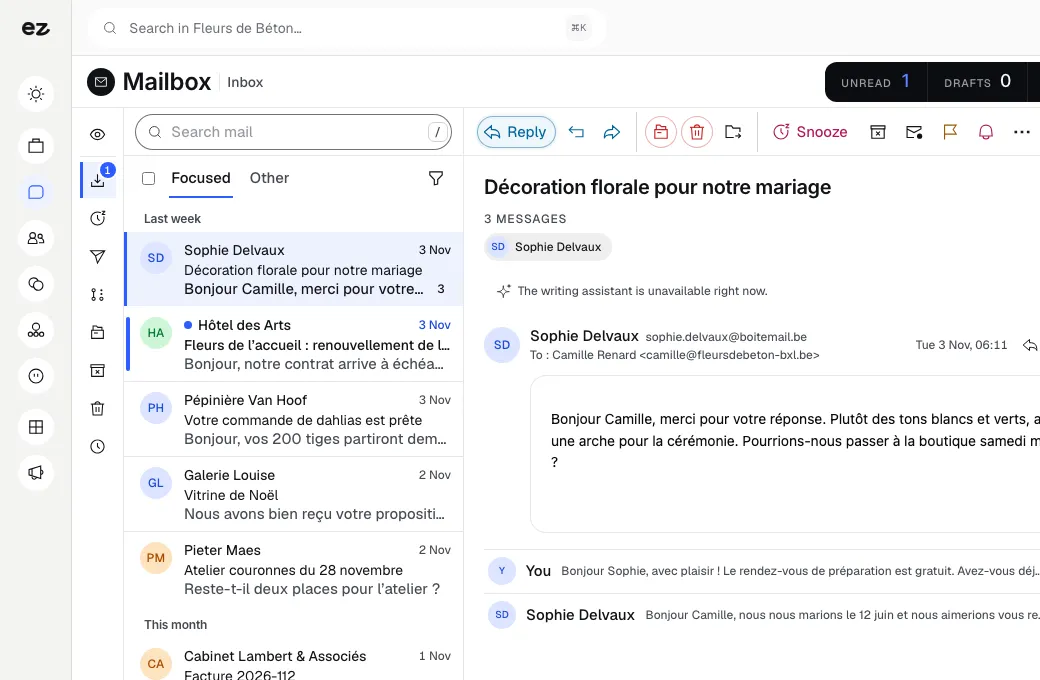
Your business inbox lives in the same dashboard as your website, customers and invoices. Grouped conversations, automatic sorting, replies from your own address and a read receipt for every message sent.

  • Grouped email threads with full history

  • Customers, leads, suppliers, newsletters: already sorted

  • A suggested reply when you need it

2×

faster replies

15 min

saved every day

Save time on every business email

Your emails live in one place, your website in another, your customers in a third. Important messages get buried, and every day starts with twenty minutes of tidying up.

With Business email, your inbox sits in the same dashboard as everything else. Conversations are grouped and sorted, and search finds any message in a second.

The result: 2× faster replies to quote requests, 15 min saved every day on email sorting, and 1 window for your emails, website and customers.

A business email address on your own domain, linked to your customer records: every conversation goes in the right place.

Who is Business email for?

  • Self-employed professionals
  • Small teams
  • Business emails to centralise
  • Too many open tabs
Book a free call

Your address, your domain, one screen

Each team member connects their own mailbox, whether it is hosted by Gmail, by Microsoft (Outlook, Microsoft 365) or by another provider over IMAP. Every conversation appears in your dashboard, and you send from your own address on your domain, the one your customers already recognise.

  • Gmail, Outlook, IMAP
    Keep your current provider and your address
  • One mailbox per member
    Each person connects their own and sees what is shared with them
  • Grouped threads
    The full exchange history stays in one conversation
  • Instant search
    Find any message or attachment in a second

Sorting takes care of itself, using your CRM

Messages arrive already sorted. An email from a customer or lead in your CRM is filed as such, and so is a contact tagged as a supplier. Newsletters, automatic notifications and internal emails from your team go into categories of their own, away from the requests waiting for a reply.

  • Customers and leads
    Sorting reads the contact's record in your CRM
  • Suppliers
    A contact tagged as a supplier is recognised on every message
  • Newsletters
    Bulk mailings are spotted by their technical headers
  • Linked customer history
    A message from a customer in your contacts opens their full history

Reply faster, know who's read it

When you open a message, you may see a suggested reply: adjust it or write your own. Once sent, see when your message was opened. You always stay in control.

  • Suggested reply
    Offered when you open a message; adjust it before sending or ignore it
  • You stay in control
    Nothing goes out without you, and no replies are sent automatically
  • Automatic signature
    Your signature is added to every email, polished and on-brand
  • Read receipt
    Know whether a customer has opened your quote before following up

Working together on the same mailbox

Open your mailbox, or a single conversation, to a colleague: read-only, or read and reply. You can also assign a thread to someone so they handle it. Everyone keeps their own access, with no shared password, and you can withdraw a share as soon as it is no longer needed.

Sharing and assignment

A mailbox or a thread opens to a colleague with permission to read or to reply. An assigned thread reaches the right person.

  • Share a whole mailbox or a single thread
  • Read-only, or read and reply
  • Threads assigned to a colleague

Invitations added to your calendar

Meeting invitations received by email are detected. Add one to your Eazyclick calendar in a click, then reply to the organiser yourself.

  • Invitations detected in your emails
  • Added to the calendar in one click
  • Nothing is added without your approval

Drafts sent in a batch

Prepare several replies as drafts, check them, then send them all at once.

  • Drafts kept in your workspace
  • Several drafts sent together
  • Nothing leaves without your approval

Connect your business inbox in 3 steps

Three steps. Nothing to worry about. A module that works for you, not the other way round.

View all modules
Step 01

Connect your inbox

Your project manager securely connects your business address to your dashboard. Conversations and history appear, organised and ready to use, without reinstalling or copying anything.

Step 02

Read and organise effortlessly

Messages arrive already sorted by category. Search finds everything in a second, and every conversation linked to a customer shows their history. See at a glance what needs a reply today.

Step 03

Reply from your domain

Reply with your own address and signature, using a suggested response if you wish. See when your messages are read and always stay in control: nothing is sent without your approval.

Modules that complement your inbox

Every module you activate strengthens the others

CRM Pro

Customer relationships

Your leads organised, tracked and followed up.

Every email links to the customer record: conversation, quote and invoice history together in one place.

Discover

Meeting notes

Management & finance

Your meetings, summarised and ready to follow up.

After a call, the summary and emails from the same customer sit side by side: you never lose track of a case.

Discover

Business email: connected to your tools

  • Gmail

    Connect your Gmail or Google Workspace mailbox in a few clicks, keeping your address.

  • Microsoft Outlook

    Connect your Outlook or Microsoft 365 mailbox, keeping your address.

  • IMAP

    Connect any other business mailbox over IMAP, with the provider of your choice.

  • CRM Pro

    Each message is sorted using the contact's record: customer, lead or supplier.

What the Business email module includes

One of Spark's 2 modules of choice, included in Boost

In a trade pack: one fixed price for all the pack's modules.

What's included

  • Included at no extra cost with CRM Pro, activated in one click; unlimited accounts, priced per website
  • Setup with your project manager

Which trades is the Business email module built for?

The Business email module is not limited to one trade. Each page below presents a business that puts it forward: what its website does, the other useful modules and our pricing. Open the one that matches yours to see the module in context.

Three plans. One tool.

Run your business and make it visible: pick the plan that fits your activity, not an imaginary budget.

excl. VAT

Free

Try Spark for free

Start for free

€ 0 for 14 days

Your pack’s Spark modules unlocked, no card needed

After 14 days: read-only account, website still online

Ziggy and help centre

Users
3 during the trial
Standard modules
Your trade’s pack
Premium modules
To discover during the trial
Website
Template website to customise, live on an Eazyclick address

Spark

Run it and be seen

Most recommended

From

€ 71/month instead of € 99

€ 192 less over 24 months than with 12 months

1 h with your project manager every month

Users
3 included, then €11 per user, decreasing
Standard modules
2 included, then decreasing
Premium modules
Optional
Website
4-page website included; 6 pages or more from €19/month, Custom or High-end

Boost

Tailor-made and multi-site

From

€ 620/month instead of € 865

€ 1,680 less over 24 months than with 12 months

2 h with your project manager every month

Users
10 included
Standard modules
Unlimited
Premium modules
Optional, SEO Boost included
Website
High-end, developed to measure
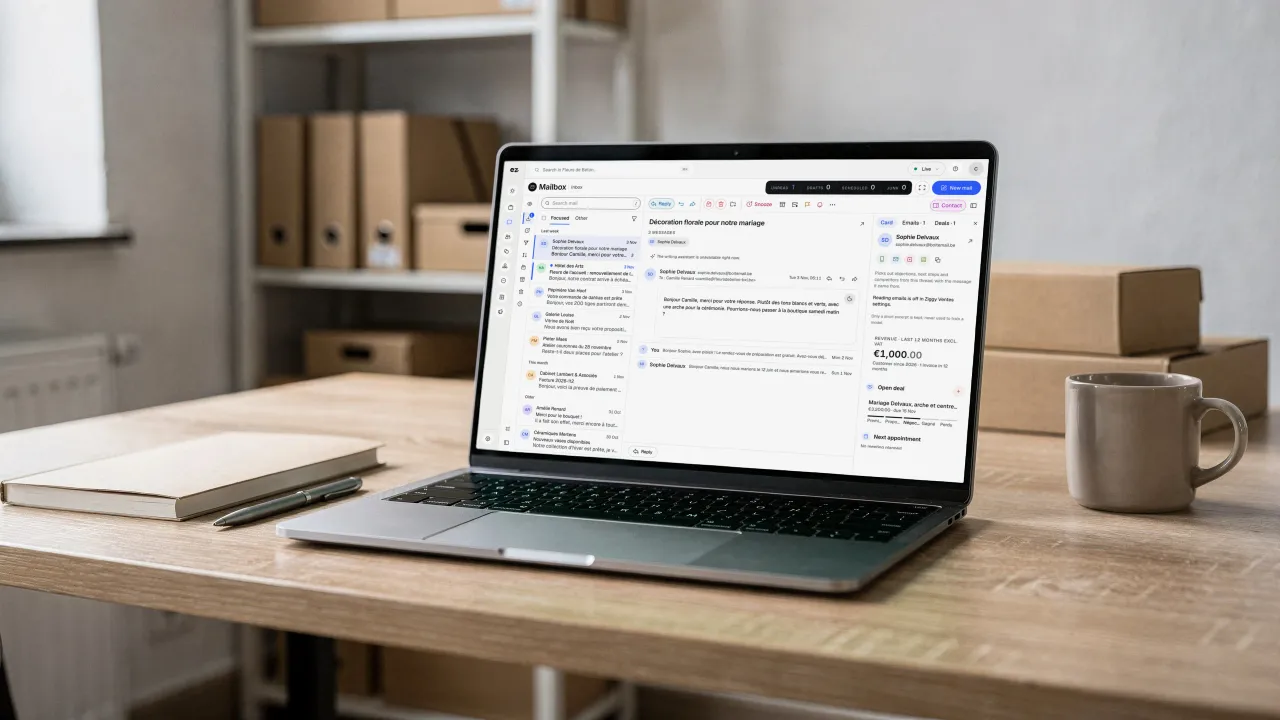
A laptop on a wooden desk, binders and boxes behind it, a mug beside it: on screen, the Mailbox, an open thread and, beside it, the client's record with their open deal

Questions? We have answers.

View all FAQs

How much does the Business email module cost?

Setup is free only if you do everything with Ziggy. You then pay a monthly subscription, lower on a 24-month commitment than on 12 months, at a price your project manager confirms. Pricing does not depend on user numbers: accounts are unlimited in your workspace. Clear pricing, no surprises.

Is this module included in a plan?

It is a standard module: one of the 2 included in Spark, and included in Boost. Your project manager helps you choose the modules your business really needs.

Do I need an existing Eazyclick website or package?

No. The Professional email module also works without an Eazyclick website, in the workspace set up by your project manager. With an Eazyclick website, your emails are stored in the same customer records as enquiries from your website. Not a customer yet? We build your plan together during an initial call.

Will my email address change?

No. Keep your current business email address. Your project manager connects it to your dashboard: continue receiving and sending from your own address, on your domain name. Nothing changes for customers; managing it simply becomes easier for you.

Will I lose my old messages and contacts?

No. Your conversations and history stay in place and appear in the dashboard as soon as you connect. Contacts remain accessible and link to your customer records. You lose nothing: everything is in one place, with much faster search than before.

Can I connect a Gmail, Outlook or IMAP mailbox?

Yes. Business email connects Gmail and Google Workspace mailboxes, Outlook and Microsoft 365 mailboxes, and any mailbox your provider makes available over IMAP. Each team member connects their own mailbox and keeps their address. Your messages appear in the dashboard, sorted by category and linked to the records in your CRM.

Can I share a mailbox with a colleague?

Yes, without handing over your password. Open your whole mailbox, or a single conversation, to a team member, either read-only or with permission to reply. You can also assign a thread to someone so they take care of it. Withdraw the share as soon as it is no longer needed.

Do suggested replies send emails on my behalf?

Never. A suggested reply saves you time, but nothing is sent without your approval. Adjust the text or write your own, then click to send. You always control what your customers receive: it is a helping hand, not autopilot.

Does open tracking respect privacy?

Tracking tells you whether your message has been opened, helping you avoid unnecessary follow-ups. It is used in line with European data rules (GDPR), and your project manager configures it with you. You control its use and can enable or disable it as needed.

Arrange your discovery call

Book a call with an expert

30 minutes, zero bullshit. We review your presence, identify the most strategic option for your goals, and tell you exactly what to do next.