The pack for your trade, 14 days with no credit card Get started
Start for free
Start for free
Log in

Kitchen display module

Kitchen display: every ticket at the right station, at the right time

Hot, cold, bar, pass: the kitchen reads the service from one screen.

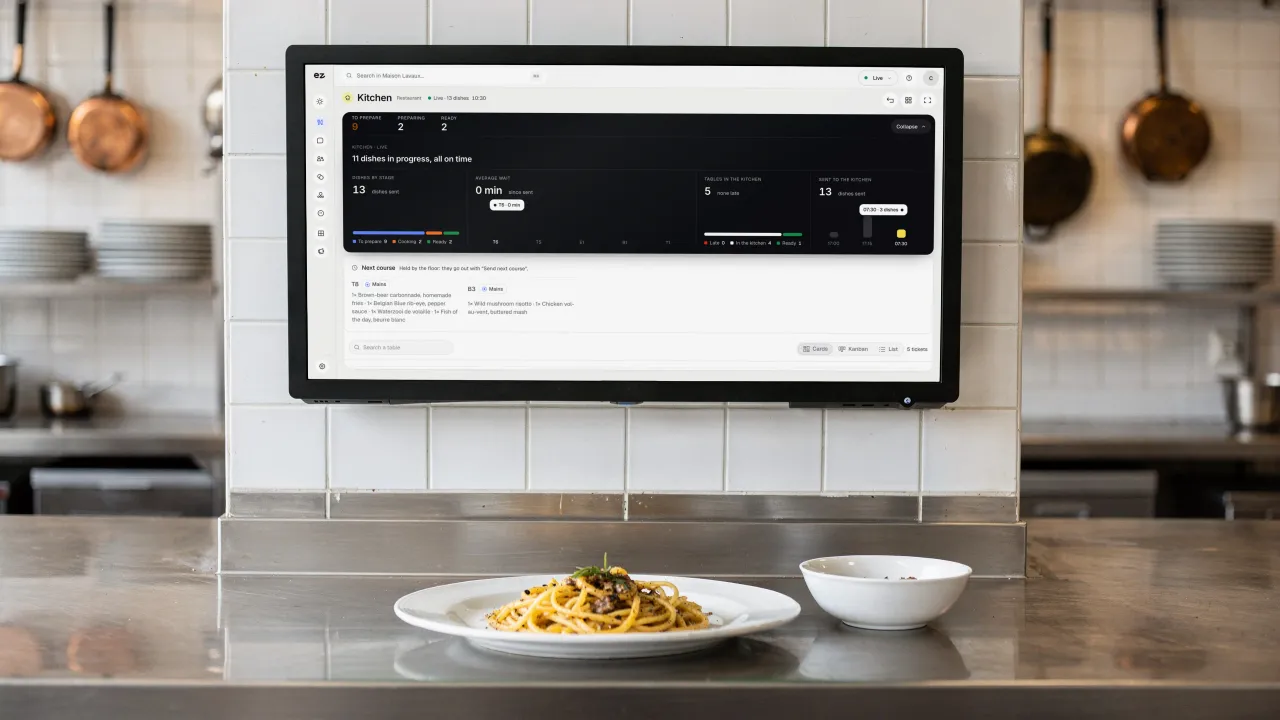
Eazyclick's kitchen display, or KDS, replaces paper tickets. Every order arrives at the station that prepares it, with the time elapsed since it was sent, flagged allergies and late tickets in red. Whether it comes from the server, the table's QR code or a takeaway order, it shows on the same screen.

Your kitchen ready in 3 steps

From your menu to the first ticket.

  1. Step 01

    Sort your menu by station

    Each menu category goes to its station, kitchen or bar: that is what sorts the tickets.

  2. Step 02

    Put the screen in the kitchen

    A tablet or a wall screen above the pass: the kitchen display opens in the browser, like the rest of Eazyclick.

  3. Step 03

    Send the first ticket

    The server sends the order, the ticket shows at its station. One tap per dish, through to "ready".

Who is the kitchen display for?

  • Restaurants and brasseries with several kitchen stations
  • Pizzerias and snack bars serving eat-in and takeaway
  • Caterers and chefs who produce in quantity
  • Bars that prepare drinks apart from the kitchen
See pricing
A kitchen display on the tiled wall above the pass: on screen, the console's Kitchen, the tables' tickets with their dishes, the time they were sent and their status

Ideal for the kitchen and the bar

The kitchen without paper tickets

The kitchen display receives every order the moment it is sent and files it at the station that prepares it: hot, cold or bar. The ticket shows the table, the server, the covers, the send time and the time elapsed. One tap moves a dish forward: to prepare, in preparation, ready.

At the pass, each table's order reads as a whole, across all stations, with what is already plated. The "To produce" line adds up the dishes in progress: the brigade fires by quantity.

of a ticket, followed live
5 states
by station, at the pass, to produce
3 views

What the kitchen used to shout at the pass, the screen now keeps

From ticket sent to plate dressed

Every ticket has its station, its send time and its status, seen by the whole brigade at once.

  • Hot, cold, bar: one filter per station
  • Time elapsed, and late tickets in red
  • Allergies at the top of the ticket

The screen in service

An evening service, seen from the kitchen

The same screen reads by station, at the pass or as a total to produce. The screens below show Maison Lavaux, our demo brasserie (in French).

Tickets, station by station

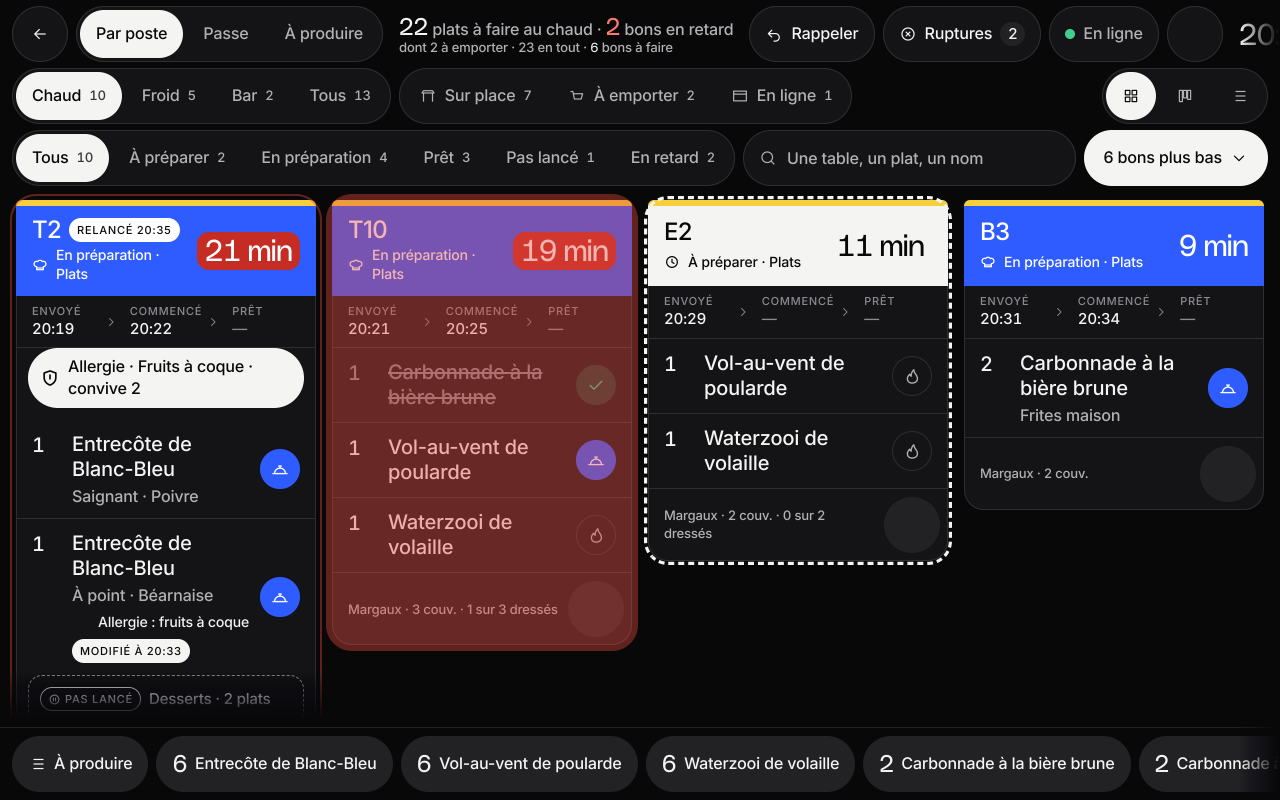
Hot, cold, bar: each station sees only what it prepares. One ticket per table, with the time it was sent, started and made ready.

  • One filter per station: hot, cold, bar, or all
  • To prepare, in preparation, ready, not fired, late
  • One tap moves the dish forward
Maison Lavaux's kitchen display, hot station: the tickets for tables T2, T10, E2 and B3 with time elapsed, a flagged nut allergy and the dishes to prepare

Time, late tickets, allergies

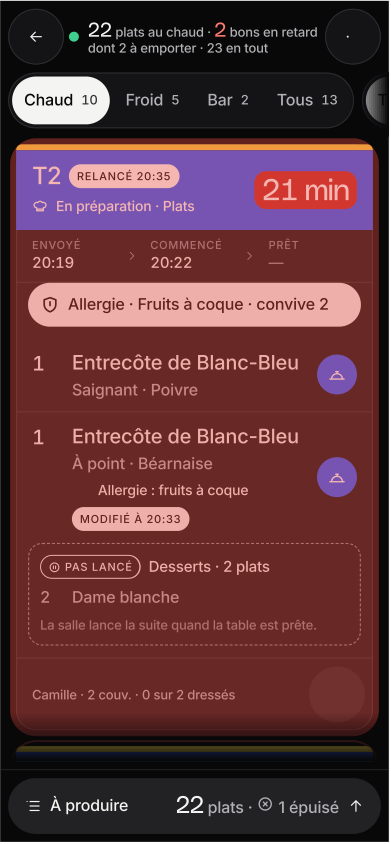
Every ticket shows the time elapsed since it was sent; when it waits too long, its timer turns red. An allergy flagged by the server stays at the top of the ticket, with the guest concerned.

  • Late tickets counted at the top of the screen
  • The allergy on the ticket and on the dish
  • A chased or changed ticket says so, with the time
The kitchen display on a phone: table T2's ticket, in preparation for 21 minutes, with a flagged nut allergy

The pass: the whole table before it goes out

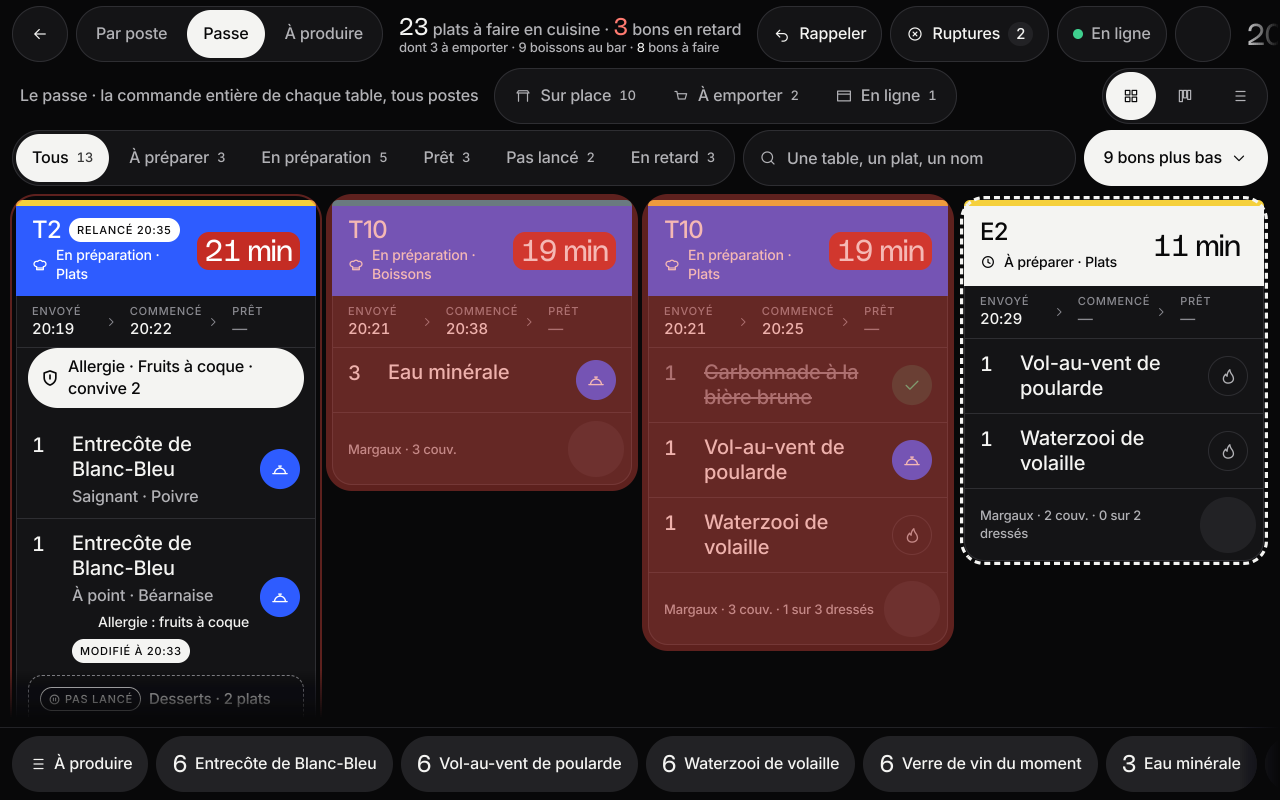
At the pass, each table's order reads as a whole, across all stations: what is plated, what is missing, what goes out next.

  • The count of plated dishes, table by table
  • The bar's drinks next to the dishes of the same table
  • Desserts not fired yet, waiting for the next course
The pass on Maison Lavaux's kitchen display: the whole order for tables T2, T10 and E2, dishes and drinks, with time elapsed and the number of dishes already plated

Floor, QR code, takeaway: one screen

The order the server takes, the one a guest places from the table's QR code and the takeaway or online order all arrive on the same screen, each with its origin.

  • Eat-in, takeaway, online: one filter per origin
  • The total to produce, dish by dish, at the bottom of the screen
  • Items that run out during service, flagged on the same screen
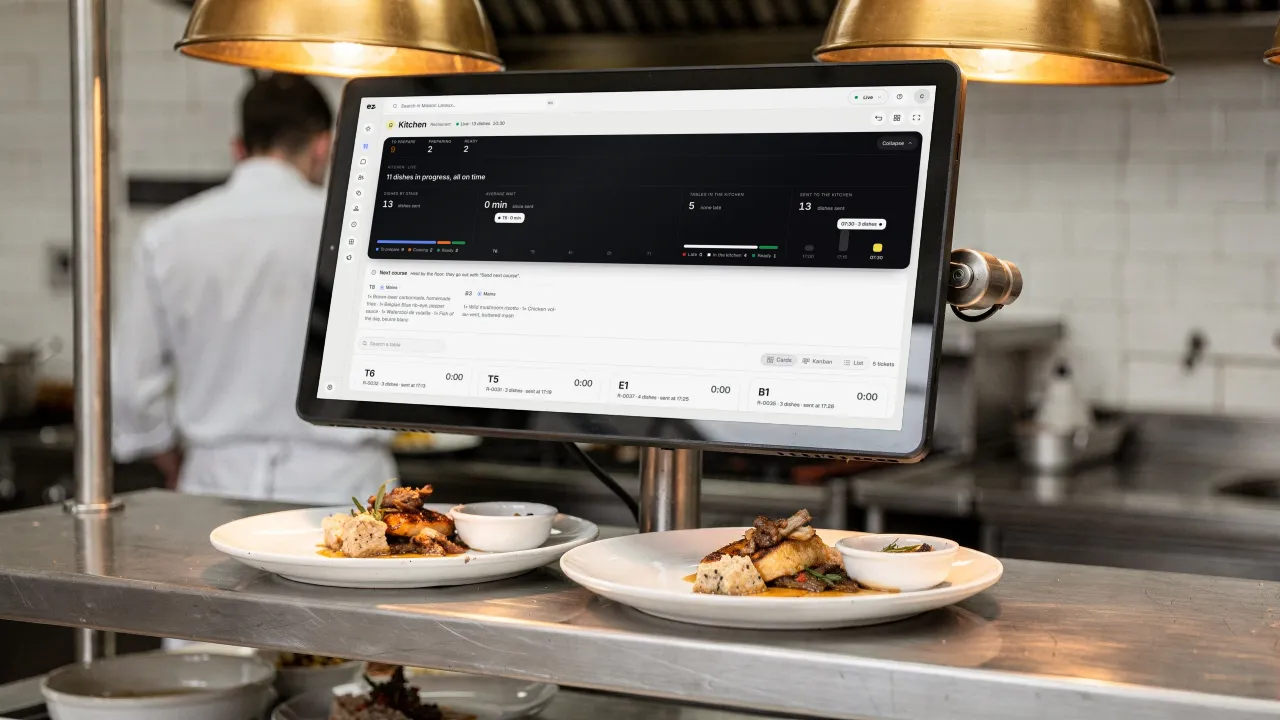
A kitchen display on an arm above the pass, where two plates are waiting: on screen, the console's Kitchen, the tables' tickets with their dishes, the time they were sent and their status

Maison Lavaux is a demo venue. The kitchen tablet or screen is not included in the subscription.

A kitchen that holds through the rush

What prevents the forgotten dish and the plate made twice.

  • A late ticket shows in the kitchen first

    When a ticket waits too long, its timer turns red and it joins the late count at the top of the screen. The kitchen sees it before the table says so.

  • The allergy does not get lost on the way

    Flagged by the server when the order is taken, the allergy stays at the top of the ticket, with the guest concerned, and is repeated on the dish.

  • The next course waits its turn

    Desserts stay "not fired" until the server sends the next course: the kitchen sees what is coming without making it too early.

The modules that send their orders to the kitchen

Every module you switch on strengthens the others

Discover all modules

What the Kitchen display module includes

A feature included in another module, with no price of its own

What's included

  • Tickets by station: hot, cold, bar
  • Time elapsed and late tickets flagged
  • Allergies at the top of the ticket
  • Pass view and total to produce

Included in: Table ordering

The kitchen display comes with the Table ordering module. The kitchen tablet or screen is not included.

Pricing

Three plans. One tool.

Run your business and make it visible: pick the plan that fits your activity, not an imaginary budget.

Spark or trade pack: what’s the difference?

Spark is the base: your website and 2 modules, € 71/month excl. VAT over 24 months. Trade packs are Spark already set up for your business (its modules, its website, its users), at a fixed price: for example the Restaurant pack, € 89/month excl. VAT over 24 months.

Free

Try free for 14 days

Start for free

€ 0 for 14 days

Your trade’s pack on trial, no card needed

  • After 14 days: read-only account, website still online
  • Ziggy and help centre
  • Users 3 during the trial
  • Standard modules Your trade’s pack
  • Premium modules To discover during the trial
  • Website Template website to customise, live on an Eazyclick address
Start the free trial
Most recommended

Spark

Run it and be seen

From

€ 99 € 71 € 79 € 99 /month

€ 672 less over 24 months than with no commitment € 240 less over 12 months than with no commitment No commitment, or € 71/month over 24 months

  • 1 h with your project manager every month
  • Users 3 included, then €11 per user, decreasing 3 included, then €12 per user, decreasing 3 included, then €15 per user, decreasing
  • Standard modules 2 included, then decreasing
  • Premium modules Optional
  • Website 4-page website included; 6 pages or more from €19/month, custom-made as Custom or High-end
Get my price from Ziggy

Boost

Tailor-made and multi-site

From

€ 865 € 620 € 690 € 865 /month

€ 5,880 less over 24 months than with no commitment € 2,100 less over 12 months than with no commitment No commitment, or € 620/month over 24 months

  • 2 h with your project manager every month
  • Users 10 included
  • Standard modules Unlimited
  • Premium modules Optional, SEO Boost included
  • Website Custom-made, up to High-end
Talk to an expert

Prices excl. VAT. Free is a 14-day free trial; Spark and Boost run for 24 months, 12 months or with no commitment. Beyond the 2 standard modules included in Spark, each extra module costs less than the one before; premium modules and SEA campaigns are added à la carte. SEO Boost is included in Boost and optional with Spark.

Questions? We have answers.

View all FAQs

How much does the kitchen display cost?

It comes with the Table ordering module: it has no price of its own. Hardware is not included: the kitchen display opens on a tablet or on a screen you put in the kitchen.

What is a kitchen display system (KDS)?

A KDS is the screen that replaces paper tickets in the kitchen: every order shows at the station that prepares it, with its send time and its status. Eazyclick's is part of the same software as order taking, the menu and bookings.

Does the kitchen still get a printed ticket?

Not yet: the kitchen and the bar receive the order on the kitchen display, filtered by station. Kitchen printing is planned.

Where do the orders on the kitchen display come from?

From the server, who takes the order at the table; from the guest, who orders from the table's QR code; and from takeaway or online orders. The screen tells them apart: eat-in, takeaway, online.

How does an allergy reach the kitchen?

The server flags it when taking the order. It shows at the top of the ticket, with the guest concerned, and on the dish itself.

Does the bar have its own station?

Yes. The bar is a station like the others: the "Bar" filter shows only the drinks to prepare, and the pass shows them with the dishes of the same table.

Let’s talk about how you work

Talk to an expert

In 30 minutes, we look at how you manage your customers, quotes and invoices. We show you how Eazyclick fits your business and what you need to get started.

Free 30-minute call